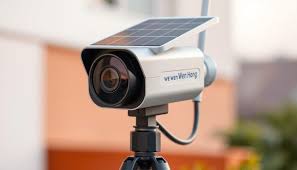
Ever find yourself juggling the desire for a safer home with the nagging feeling of a rising electricity bill? You want to keep an eye on your property, but the thought of drilling holes, running ugly wires, and contributing to a bigger carbon footprint just doesn’t sit right. It feels like a trade-off you shouldn’t have to make. Well, what if I told you there’s a brilliant solution that gives you top-tier security without the environmental or financial guilt? Enter the Solar Powered Home Camera For Sustainable Living, a game-changer that harnesses the sun’s free, clean energy to protect what matters most. It’s security, unplugged and untethered.
Why Even Bother with a Home Camera?
Let’s get back to basics for a moment. Why do we install a camera in the first place? It’s not about being paranoid; it’s about being proactive. A visible camera is one of the most effective deterrents against potential intruders. It’s a silent guardian that says, “You’re on camera, think twice.”
Beyond deterrence, it’s your set of eyes when you’re not there. At my own home, my camera helped me prove a delivery driver tossed a fragile package over the gate, which led to a quick replacement. It lets me check if the kids got home from school safely or see which neighborhood dog is digging up my flower beds. It’s about peace of mind, plain and simple.
The Solar Revolution: Why Your Next Camera Should Be Sun-Powered
Traditional cameras are great, but they come with strings attached—literally. This is where solar-powered models truly shine, and not just because they love the sun. They represent a fundamental shift in how we approach home security.
The Obvious Win: Zero Running Costs
This is the big one. Once you’ve purchased your camera, the power is free. It sips energy from the sun during the day to charge its internal battery, which then keeps it running all night and on cloudy days. Think about that: 24/7 security without adding a single cent to your monthly electricity bill. Over the life of the camera, the savings can really add up.
Freedom from Wires: Install It Absolutely Anywhere
Have a dark corner in your backyard, a shed at the end of the garden, or a long driveway you want to monitor? With a traditional wired camera, you’d be looking at a complicated, expensive, and messy installation involving drills, cables, and maybe even an electrician.
A solar powered camera throws that rulebook out the window. As long as the spot gets a few hours of sunlight each day, you can mount it. This flexibility is revolutionary, allowing you to place security exactly where you need it, not just where an outlet happens to be.
Eco-Friendly Peace of Mind
Choosing a solar powered home camera for sustainable living is more than a practical decision; it’s a statement. You’re actively choosing a greener, more sustainable option. By reducing your reliance on fossil fuels, you’re making a small but meaningful contribution to a healthier planet. This alignment of security with personal values is something you just can’t get from a standard plug-in device.
What to Look for in a Solar Powered Home Camera for Sustainable living
Alright, you’re sold on the concept. But not all solar cameras are created equal. As a security expert, I always tell my clients to look beyond the marketing and focus on the features that actually deliver reliable performance.
Solar Panel & Battery Life: The Power Duo
The heart of any solar camera is its ability to gather and store power.
- Solar Panel Wattage: A higher wattage panel (e.g., 3-5 watts) can charge the battery faster, which is crucial if you live in an area with frequent cloudy days.
- Battery Capacity (mAh): This is your camera’s fuel tank. Look for a high capacity, typically 5,000mAh or more. A larger battery can keep the camera running for weeks or even months on a single full charge, without any sun.
Video Quality: Seeing is Believing
What’s the point of a camera if the footage is a blurry mess?
- Resolution: 1080p (Full HD) is the standard minimum. However, 2K or 4K cameras are becoming more common and offer incredible detail, allowing you to zoom in on faces or license plates.
- Night Vision: Most cameras use infrared (IR) LEDs for black-and-white night vision. Some premium models offer color night vision, which uses built-in spotlights to provide a full-color image after dark. This can be a game-changer for identifying details like the color of a car or a person’s clothing.
Weather Resistance: Built for the Great Outdoors
Your outdoor camera will face rain, snow, heat, and dust. The IP (Ingress Protection) rating tells you how well it can handle the elements.
IP Rating, Simplified: The rating has two numbers. The first (0-6) is for dust/solid protection, and the second (0-8) is for water protection. For an outdoor camera, you should look for at least an IP65 rating, which means it’s dust-tight and can withstand water jets from any direction (i.e., heavy rain). An IP66 or IP67 rating is even better.
Smart Features: Not Just a Pretty Lens
Modern cameras are more than just recording devices; they’re intelligent sentinels.
- Motion Detection: Look for Passive Infrared (PIR) sensors, which detect body heat. This is far more accurate and results in fewer false alarms from waving branches or passing cars compared to pixel-based motion detection.
- AI-Powered Alerts: The best cameras use artificial intelligence to distinguish between people, animals, vehicles, and packages. This means you only get notified about what truly matters.
- Two-Way Audio: A built-in microphone and speaker let you hear what’s happening and speak through the camera. It’s perfect for telling a delivery driver where to leave a package or warning off an unwanted visitor.
How Do I Install My Solar Security Camera? A Simple Guide
Feeling intimidated by the idea of installation? Don’t be. One of the best things about a solar powered home camera for sustainable living is how ridiculously easy it is to set up.
- Charge It Up First: Before you climb any ladders, fully charge the camera’s internal battery using the included USB cable. This gives it a strong starting point.
- Pick the Perfect Spot: Walk around your property. Find a spot with a clear view of the area you want to monitor. For security, aim for a height of 8-10 feet, which is high enough to be out of easy reach but low enough to capture clear facial details.
- Mount the Camera: Most cameras come with a simple mounting bracket and a few screws. It usually takes less than 15 minutes to secure it to a wall, eave, or tree.
- Position the Solar Panel: This is the most important step! Find a nearby spot for the panel that gets the most direct sunlight throughout the day. Most panels come with a long cable, giving you flexibility. Ensure it’s angled towards the sun and not shaded by trees or roof overhangs.
- Sync with the App: Download the manufacturer’s app on your smartphone and follow the on-screen instructions to connect the camera to your Wi-Fi network. You’ll be viewing a live feed in minutes!
Pro Tips: Getting the Most Out of Your Solar Camera
- Angle for the Sun: In the Northern Hemisphere, a south-facing position for your solar panel is ideal to maximize sun exposure.
- Keep It Clean: Every few months, give the solar panel a quick wipe with a soft cloth to remove any dust or pollen that could hinder its performance.
- Optimize Motion Settings: Tweak the motion sensitivity in the app. If you’re getting too many alerts, lower it. If it’s missing events, raise it. Set up activity zones to focus only on key areas like your walkway or driveway.
|
Our Picks for the Best Home Camera in 2026
As an Amazon Associate, we earn from qualifying purchases.
|
||
| Num | Product | Action |
|---|---|---|
| 1 | Blink Mini 2 — Home Security & Pet Camera(s) with HD video, color night view, motion detection, two-way audio, and built-in spotlight — 1 camera (Black) |

|
| 2 | 2K Cameras for Home Security-Outdoor/Indoor Camera for Dog/Cat/Pet/Nanny/Baby, Color Night Vision, White Light, Siren, 24/7 SD Recordings, Works with Alexa/Google Home, C1 (C1-White-2pack-2.4G) |
|
| 3 | WYZE Cam Pan v3, Indoor/Outdoor IP65-Rated 1080p Pan/Tilt/Zoom Wi-Fi Smart Home Security Camera with Color Night Vision, 2-Way Audio, Compatible with Alexa & Google Assistant, Free Expert Setup |
|
| 4 | Ring Outdoor Cam (Stick Up Cam) | Weather-Resistant Outdoor Camera, Live View, Color Night Vision, Two-Way Talk, Motion alerts, Works with Alexa | White |
|
| 5 | Kasa Smart Indoor Pan-Tilt Home Security Camera, 1080p HD Dog Camera w/Night Vision, Motion Detection for Baby & Pet Monitor, Cloud & SD Card Storage, Works w/ Alexa & Google Home, 2.4G WiFi (EC71) |
|
| 6 | Ring Battery Doorbell | Home or business security with Head-to-Toe Video, Live View with Two-Way Talk, and Motion Detection & Alerts (newest model), Venetian Bronze |
|
| 7 | Tapo TP-Link 1080P Indoor Security Camera for Baby Monitor, Dog Camera w/Motion Detection, 2-Way Audio Siren, Night Vision, Cloud & SD Card Storage, Works w/Alexa & Google Home C100 |
|
| 8 | TP-Link Tapo Pan/Tilt Security Camera for Baby Monitor, Pet Camera w/Motion Detection, 1080P, 2-Way Audio, Night Vision, Cloud & SD Card Storage, Works with Alexa & Google Home (Tapo C200) |
|
| 9 | WYZE Cam v4 (Latest Model), 2.5K AI Security Camera, Indoor/Outdoor Cameras for Home Security, Baby Monitor & Pet Camera, Vibrant Color Night Vision, No Subscription Required, Free Expert Help |
|
| 10 | TP-Link Tapo 2K Pan/Tilt Security Camera for Baby Monitor, Dog Camera w/Motion Detection, 2-Way Audio, Siren, Night Vision, Cloud & SD Card Storage, Works with Alexa & Google Home, 2-Pack (C210P2) |
|
Let’s Talk Privacy: Is My Solar Camera Hack-Proof?
This is a question I get all the time, and it’s a critical one. Your camera is protecting your home, so you need to protect your camera. The good news is that reputable brands take security seriously. But security is a partnership between the manufacturer and you.
“A wireless camera, solar-powered or not, is a node on your network. Treat it with the same seriousness as your laptop. Always use strong, unique passwords and enable two-factor authentication. Most breaches aren’t sophisticated hacks; they’re the result of weak credentials.” – Dr. Evelyn Reed, Cybersecurity Analyst
Here’s your security checklist:
- Create a Strong Password: Don’t use “admin” or “password123”. Create a long, complex password unique to your camera.
- Enable Two-Factor Authentication (2FA): This adds a second layer of security, usually a code sent to your phone, making it nearly impossible for someone to log in without physical access to your device.
- Keep Firmware Updated: Manufacturers release updates to patch security vulnerabilities. Always install them as soon as they’re available.
Making It Part of the Family: Smart Home Integration
The best solar powered home camera for sustainable living doesn’t just work on its own; it plays well with others. Look for compatibility with smart home ecosystems like Amazon Alexa or Google Assistant. This allows you to do things like say, “Hey Google, show me the backyard camera” and instantly see the live feed on your smart display.
Frequently Asked Questions (FAQ)
Q: Do solar powered home cameras work at night or on cloudy days?
A: Absolutely. During the day, the solar panel charges a large internal battery. This battery powers the camera through the night and can typically last for weeks or even months on a full charge, easily handling a string of cloudy days.
Q: Do solar powered cameras need Wi-Fi to work?
A: Yes, most models require a 2.4 GHz Wi-Fi connection to stream live video, send notifications to your phone, and store recordings in the cloud. Some specialized models use a 4G/LTE cellular connection, which is great for truly off-grid locations without Wi-Fi.
Q: How much direct sunlight does a solar camera really need?
A: Generally, just 2-3 hours of direct sunlight per day is enough to keep the battery topped up for normal use. The efficiency of the panel and the camera’s power consumption will influence the exact amount needed.
Q: Are these cameras difficult to maintain?
A: Not at all. Their main maintenance requirement is to periodically wipe the solar panel and camera lens to ensure they are free of dirt and debris. This usually only needs to be done a few times a year.
Q: Can a solar powered camera record 24/7?
A: While technically possible, most solar cameras are designed to be motion-activated to conserve battery life. They sleep in a low-power state and wake up instantly to record when they detect motion. This is more than sufficient for security purposes and ensures the battery lasts as long as possible.
Your Home, Smarter and Greener
Choosing a security solution is about more than just technology; it’s about finding a system that fits your lifestyle and values. It’s about feeling safe without feeling complicated or wasteful.
A solar powered home camera for sustainable living offers the perfect blend of modern security, incredible convenience, and environmental responsibility. It’s a smart investment that protects your home, your wallet, and the planet. By making this informed choice, you’re not just buying a camera; you’re adopting a smarter, more secure, and sustainable way of life.