Let’s be honest, we’ve all had that nagging feeling. Did I lock the back door? Is the dog tearing up the new couch? Who’s that knocking at this hour? In today’s world, peace of mind is priceless. That’s why so many people are looking to buy a smart home camera wifi system. It’s not about being paranoid; it’s about being prepared and connected to the one place that matters most: your home. But with a sea of options out there, choosing the right one can feel overwhelming. Don’t worry, I’m here to walk you through it, just like I would for a neighbor.
As a security expert, I’ve seen it all. I’ve helped new parents set up nursery cams and advised homeowners on the best spots to deter package thieves. The goal is always the same: to find a simple, reliable solution that fits your life. This guide will cut through the technical jargon and give you the straightforward advice you need to find the perfect smart camera for your family.
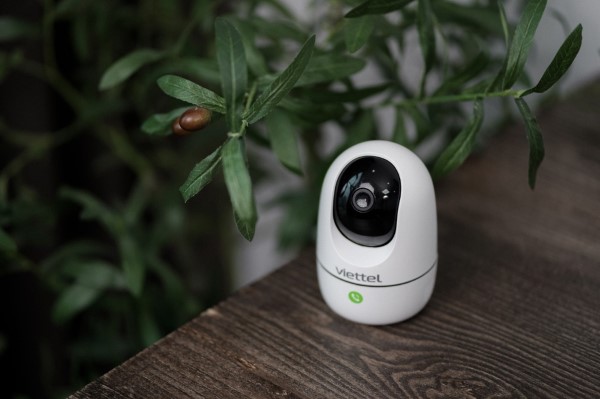
Why Do You Even Need a Smart Home Camera?
You might be thinking, “Is a camera really necessary?” For many, the answer is a resounding yes. Think of it less as a surveillance device and more as a window back to your home, accessible right from your pocket.
A few years ago, my own outdoor camera alerted me to a delivery driver leaving a fragile package in the pouring rain, propped against the gate. I was able to use the two-way audio to ask him to kindly move it to the covered porch. It was a small thing, but it saved a valuable item and a lot of hassle.
Here’s what a smart camera really gives you:
- Peace of Mind: Check in on your home, kids, or elderly parents from anywhere in the world.
- Pet Monitoring: Ever wonder what your furry friends are up to? Now you can see for yourself and even talk to them.
- Deterrence: The mere presence of a visible camera is often enough to make a potential intruder think twice.
- Evidence: In the unfortunate event of a break-in or incident, high-quality video footage is invaluable for law enforcement.
What Are the Main Types of Smart Home Cameras?
Before you dive into features, it helps to know the basic categories. They generally fall into two camps, and you might even need a mix of both.
Indoor Cameras
These are your eyes and ears inside the house. They’re typically smaller, less obtrusive, and designed for monitoring specific rooms like the living room, a child’s nursery, or a main entryway. Many indoor models now come with advanced features like pan-and-tilt, allowing you to remotely look around the entire room.
Outdoor Cameras
Built to withstand the elements, these cameras are your first line of defense. They need to be weather-resistant (look for an IP rating like IP65 or higher) and are usually mounted to watch over your driveway, front porch, backyard, or garage. Their night vision capabilities are often more powerful than their indoor counterparts.
Key Features to Consider When You Buy Smart Home Camera Wifi
Alright, this is where we get into the nuts and bolts. Don’t just grab the first camera you see on sale. Understanding these features will ensure you get a device that actually meets your needs.
Video Resolution: How Clear is the Picture?
Resolution determines how detailed your video is. You’ll mainly see these options:
- 1080p (Full HD): This is the industry standard and perfectly adequate for most situations. You’ll be able to clearly see faces and details.
- 2K or 4K (Ultra HD): These offer a significantly sharper image, allowing you to zoom in on details like a license plate from further away without the image becoming a pixelated mess. The trade-off is that they use more internet bandwidth and storage space.
Night Vision: Seeing in the Dark
This is non-negotiable. There are two main types:
- Infrared (IR): This is the classic black-and-white night vision. It works by illuminating the area with infrared light that’s invisible to the human eye. It’s effective and reliable.
- Color Night Vision: A newer technology that uses advanced sensors and sometimes a small, built-in spotlight to produce a full-color image in low-light conditions. This can be a game-changer for identifying the color of a car or a person’s clothing.
Field of View (FoV): How Much Can It See?
Measured in degrees, the Field of View tells you how wide of an angle the camera can capture. A wider FoV (e.g., 130-160 degrees) is great for covering a large area like a backyard with a single camera. For a narrow hallway, a smaller FoV is fine. A pan-and-tilt camera offers the ultimate flexibility, often providing a full 360-degree view.
Two-Way Audio: Talk and Listen
This feature turns your camera into an intercom. You can hear what’s happening and speak through a built-in speaker on the camera using your smartphone app. It’s perfect for telling the delivery person where to leave a package, calming a pet, or warning off an unwanted visitor.
Motion Detection and Alerts: The “Smart” in Smart Camera
This is the core function. The camera sends a notification to your phone when it detects movement. But look for smart detection, which uses AI to tell the difference between people, animals, vehicles, and the wind blowing through trees. This drastically reduces annoying false alarms.
Storage Options: Where Do Your Videos Go?
You have two main choices for saving your recorded clips:
- Local Storage: This usually involves a microSD card that you insert directly into the camera. The benefit is that there’s no monthly fee. The downside is that if a thief steals the camera, they take the footage with them.
- Cloud Storage: Your videos are automatically uploaded to a secure server online. You can access them from anywhere, and the footage is safe even if the camera is stolen or damaged. Most brands offer this as a monthly subscription service.
|
Our Picks for the Best Home Camera in 2026
As an Amazon Associate, we earn from qualifying purchases.
|
||
| Num | Product | Action |
|---|---|---|
| 1 | Ring Outdoor Cam (Stick Up Cam) | Weather-Resistant Outdoor Camera, Live View, Color Night Vision, Two-Way Talk, Motion alerts, Works with Alexa | White |

|
| 2 | Blink Mini 2 — Home Security & Pet Camera(s) with HD video, color night view, motion detection, two-way audio, and built-in spotlight — 1 camera (Black) |
|
| 3 | WYZE Cam Pan v3, Indoor/Outdoor IP65-Rated 1080p Pan/Tilt/Zoom Wi-Fi Smart Home Security Camera with Color Night Vision, 2-Way Audio, Compatible with Alexa & Google Assistant, Free Expert Setup |
|
| 4 | TP-Link Tapo Pan/Tilt Security Camera for Baby Monitor, Pet Camera w/Motion Detection, 1080P, 2-Way Audio, Night Vision, Cloud & SD Card Storage, Works with Alexa & Google Home (Tapo C200) |
|
| 5 | Kasa Smart Indoor Pan-Tilt Home Security Camera, 1080p HD Dog Camera w/Night Vision, Motion Detection for Baby & Pet Monitor, Cloud & SD Card Storage, Works w/ Alexa & Google Home, 2.4G WiFi (EC71) |
|
| 6 | TP-Link Tapo 2K Pan/Tilt Security Camera for Baby Monitor, Dog Camera w/Motion Detection, 2-Way Audio, Siren, Night Vision, Cloud & SD Card Storage, Works with Alexa & Google Home, 2-Pack (C210P2) |
|
| 7 | WYZE Cam v4 (Latest Model), 2.5K AI Security Camera, Indoor/Outdoor Cameras for Home Security, Baby Monitor & Pet Camera, Vibrant Color Night Vision, No Subscription Required, Free Expert Help |
|
| 8 | Ring Battery Doorbell | Home or business security with Head-to-Toe Video, Live View with Two-Way Talk, and Motion Detection & Alerts (newest model), Venetian Bronze |
|
| 9 | Tapo TP-Link 1080P Indoor Security Camera for Baby Monitor, Dog Camera w/Motion Detection, 2-Way Audio Siren, Night Vision, Cloud & SD Card Storage, Works w/Alexa & Google Home C100 |
|
| 10 | 2K Cameras for Home Security-Outdoor/Indoor Camera for Dog/Cat/Pet/Nanny/Baby, Color Night Vision, White Light, Siren, 24/7 SD Recordings, Works with Alexa/Google Home, C1 (C1-White-2pack-2.4G) |
|
How to Install Your New Camera (It’s Easier Than You Think!)
Forget drilling massive holes and running complex wiring. Most modern Wi-Fi cameras are designed for a simple DIY setup.
- Unbox and Power Up: Take the camera out of the box and plug it into a power source. If it’s a battery-powered model, make sure it’s fully charged.
- Download the App: Every smart camera has a companion app for your smartphone. Download it from the Apple App Store or Google Play Store.
- Connect to Wi-Fi: Follow the in-app instructions. This usually involves scanning a QR code on the camera and entering your home’s Wi-Fi password. It typically takes less than five minutes.
- Find the Perfect Spot: Before you permanently mount it, use the live view on your phone to find the best placement. For outdoor cameras, aim for a high vantage point that covers key entry points but is out of easy reach. For indoor cameras, a corner of a room often provides the best coverage.
- Mount It: Use the included hardware to securely mount the camera. For many indoor models, simply placing it on a shelf is enough.
Let’s Talk Privacy: Securing Your Smart Camera
A camera meant to protect you shouldn’t become a vulnerability. Securing your device is just as important as choosing it. As a security professional, this is the part I stress the most.
“Your smart camera is only as secure as the network it’s connected to and the password you use to protect it. Always use a strong, unique password for your camera’s account and enable two-factor authentication. It’s the digital equivalent of deadbolting your front door.”
— Dr. Eleanor Vance, Cybersecurity Analyst
Here’s a simple checklist to keep your camera secure:
- Use a Strong Password: Don’t use “password123”. Create a long, unique password with a mix of letters, numbers, and symbols.
- Enable Two-Factor Authentication (2FA): This adds a second layer of security, usually a code sent to your phone, before anyone can log into your account.
- Keep Firmware Updated: Manufacturers regularly release updates to patch security holes. Enable automatic updates in the app if possible.
- Secure Your Wi-Fi Network: Make sure your home Wi-Fi itself has a strong password.
Integrating Your Camera with Your Smart Home
The real magic happens when your devices work together. If you already use a Smart Home ASsistant, look for a camera that’s compatible.
- Amazon Alexa: “Alexa, show me the front door camera.” You can view your camera’s live feed on an Echo Show or Fire TV.
- Google Assistant: “Hey Google, show me the backyard.” Similarly, you can stream the feed to a Nest Hub or a Chromecast-enabled TV.
- IFTTT (If This, Then That): This service lets you create powerful automations, like having your smart lights turn on automatically when your outdoor camera detects motion at night.
Frequently Asked Questions (FAQ)
Q: Do Wi-Fi cameras work without an internet connection?
A: For most features, like remote viewing and cloud storage, an internet connection is required. However, some cameras with local microSD card storage can continue to record footage even if the Wi-Fi goes down, which you can review later once the connection is restored.
Q: How much data does a smart home camera use?
A: This varies greatly depending on the video resolution and how often it records. A 1080p camera might use between 60GB and 120GB of data per month if it’s recording frequently. It’s best to check the manufacturer’s estimates and ensure your internet plan can handle it.
Q: Can I use multiple cameras from different brands together?
A: Generally, you’ll need to use each brand’s specific app to view their cameras. While some platforms like Apple HomeKit or Amazon Alexa can group different brands for viewing, you typically get the best experience and all the features by sticking with a single brand ecosystem.
Q: Are battery-powered cameras as good as wired ones?
A: Battery-powered cameras offer incredible flexibility in placement since you don’t need a nearby outlet. However, you’ll need to recharge them every few months. Wired cameras provide constant power and are often preferred for critical locations like a front door.
Q: What is the best place to install an outdoor security camera?
A: The best placement is about 8-10 feet off the ground, high enough to get a good view and be out of easy reach, but not so high that you can’t identify faces. Point it towards key entry points like your front door, back door, garage, or first-floor windows.
Your Home, Your Peace of Mind
Choosing the right security solution is a personal decision. The goal isn’t to turn your home into a fortress but to add a layer of convenience and security that brings you comfort. By understanding the key features and thinking about your specific needs, you can confidently buy a smart home camera wifi system that works for you. It’s a small investment that pays huge dividends in the form of safety, connection, and most importantly, peace of mind. Now you can make an informed choice and feel more secure in your own home.