Let’s cut to the chase. You’re here because you’re thinking about home security, and the name D-Link has popped up. You’ve probably seen their routers, but cameras? Are they any good? As a security solutions expert, I get this question a lot. That’s why I’ve put together this comprehensive D-Link Home Camera Review to give you the unvarnished truth. We’re going to go beyond the marketing jargon and talk about what it’s really like to live with one of these cameras watching over your home. Is it the right choice for keeping your family, pets, and packages safe? Let’s find out together.
Why Do You Even Need a Home Camera in the First Place?
Before we dive into the specifics of D-Link, let’s talk about the “why.” A few years ago, a home camera felt like a luxury. Today, it’s practically essential. I’ve seen it all in my line of work, and believe me, the peace of mind a simple camera provides is worth its weight in gold.
Picture this: you’re at work, and you get a notification that there’s motion at your front door. Is it the delivery you’ve been waiting for, or something more concerning? Instead of worrying, you just tap on your phone and see a live feed. Or maybe you have a new puppy, like my sister does. She uses her indoor camera to make sure her little troublemaker isn’t chewing through the new couch. From checking on elderly parents to simply confirming you locked the door, a home camera is your set of eyes when you can’t be there. It’s not about paranoia; it’s about being connected and in control.
A Deep Dive: The Comprehensive D-Link Home Camera Review
So, where does D-Link fit into this picture? D-Link has been in the networking game for a long time, and they’ve leveraged that experience to create a range of smart home devices, including cameras. They tend to compete in a crowded market against giants like Ring, Arlo, and Wyze. Their main selling point is often a combination of feature-rich hardware without the mandatory monthly subscription fees that plague many competitors.
What Sets D-Link Apart? The Good Stuff
D-Link cameras have some compelling advantages that make them a strong contender, especially for budget-conscious homeowners who still want advanced features.
- No Mandatory Subscriptions: This is a big one. While they do offer a premium cloud recording plan, most of their cameras come with a free tier that’s often generous enough for basic use. More importantly, nearly all their cameras support local storage via a microSD card. This means you control your own footage, and you don’t have to pay a monthly fee just to see what happened yesterday.
- Advanced AI Detection: Many modern D-Link cameras go beyond simple motion detection. They have onboard AI that can distinguish between a person, a vehicle, a pet, or just a tree branch swaying in the wind. This drastically reduces the number of false alarms, so when you get a notification, you know it’s something worth checking.
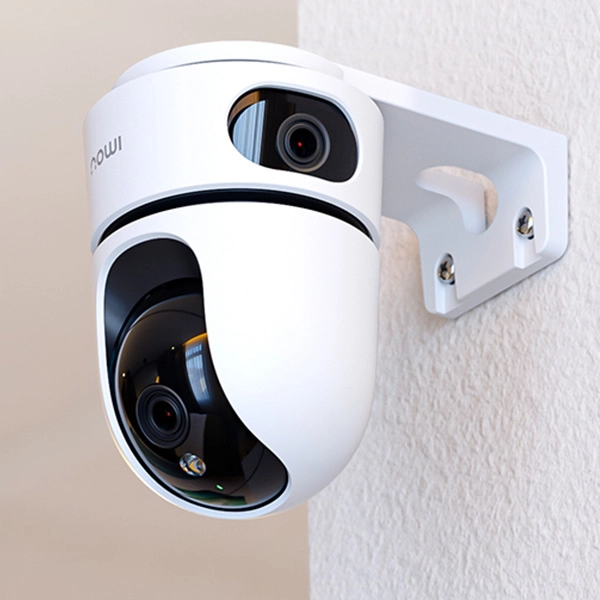
- Solid Hardware Quality: D-Link cameras generally feel well-built. They offer a variety of models, from simple indoor monitors to robust outdoor cameras with weatherproofing and even sophisticated pan-and-tilt models that can survey an entire room.
- Strong Network Security: Coming from a networking background, D-Link puts a decent emphasis on security. Many of their newer devices support the latest WPA3 Wi-Fi encryption standard, which is a significant step up in protecting your device from unauthorized access.
Let’s Talk Features: What Really Matters?
When you’re comparing models, the spec sheet can be overwhelming. Here’s a breakdown of the key features on a D-Link camera and what they actually mean for you.
- Resolution (1080p, 2K, 4K): This is the clarity of the video. 1080p (Full HD) is the standard and is perfectly fine for most situations. 2K offers a noticeable step up in detail, which can be useful for zooming in on a face or license plate from a distance.
- Field of View (FoV): Measured in degrees, this tells you how much the camera can see at once. A wider FoV (e.g., 135° or more) is great for covering a large area like a backyard, while a narrower FoV might be fine for a hallway.
- Night Vision: All decent security cameras have this. D-Link uses infrared (IR) LEDs, which produce a clear black-and-white image in complete darkness. Some higher-end models might offer color night vision, which uses ambient light to produce a colored image, but its effectiveness can vary.
- Two-Way Audio: This lets you listen in and talk back through the camera’s built-in microphone and speaker. It’s fantastic for telling a delivery driver where to leave a package or for calming a pet while you’re away.
- Pan & Tilt: This feature, found on specific indoor models, allows you to remotely move the camera lens left, right, up, and down. It’s perfect for covering a large, open-plan living area with a single device.
|
Our Picks for the Best Home Camera in 2026
As an Amazon Associate, we earn from qualifying purchases.
|
||
| Num | Product | Action |
|---|---|---|
| 1 | TP-Link Tapo Pan/Tilt Security Camera for Baby Monitor, Pet Camera w/Motion Detection, 1080P, 2-Way Audio, Night Vision, Cloud & SD Card Storage, Works with Alexa & Google Home (Tapo C200) |

|
| 2 | Blink Mini 2 — Home Security & Pet Camera(s) with HD video, color night view, motion detection, two-way audio, and built-in spotlight — 1 camera (Black) |
|
| 3 | Tapo TP-Link 1080P Indoor Security Camera for Baby Monitor, Dog Camera w/Motion Detection, 2-Way Audio Siren, Night Vision, Cloud & SD Card Storage, Works w/Alexa & Google Home C100 |
|
| 4 | WYZE Cam v4 (Latest Model), 2.5K AI Security Camera, Indoor/Outdoor Cameras for Home Security, Baby Monitor & Pet Camera, Vibrant Color Night Vision, No Subscription Required, Free Expert Help |
|
| 5 | WYZE Cam Pan v3, Indoor/Outdoor IP65-Rated 1080p Pan/Tilt/Zoom Wi-Fi Smart Home Security Camera with Color Night Vision, 2-Way Audio, Compatible with Alexa & Google Assistant, Free Expert Setup |
|
| 6 | Kasa Smart Indoor Pan-Tilt Home Security Camera, 1080p HD Dog Camera w/Night Vision, Motion Detection for Baby & Pet Monitor, Cloud & SD Card Storage, Works w/ Alexa & Google Home, 2.4G WiFi (EC71) |
|
| 7 | Ring Outdoor Cam (Stick Up Cam) | Weather-Resistant Outdoor Camera, Live View, Color Night Vision, Two-Way Talk, Motion alerts, Works with Alexa | White |
|
| 8 | Ring Battery Doorbell | Home or business security with Head-to-Toe Video, Live View with Two-Way Talk, and Motion Detection & Alerts (newest model), Venetian Bronze |
|
| 9 | 2K Cameras for Home Security-Outdoor/Indoor Camera for Dog/Cat/Pet/Nanny/Baby, Color Night Vision, White Light, Siren, 24/7 SD Recordings, Works with Alexa/Google Home, C1 (C1-White-2pack-2.4G) |
|
| 10 | TP-Link Tapo 2K Pan/Tilt Security Camera for Baby Monitor, Dog Camera w/Motion Detection, 2-Way Audio, Siren, Night Vision, Cloud & SD Card Storage, Works with Alexa & Google Home, 2-Pack (C210P2) |
|
Where Do They Fall Short? An Honest Look
No product is perfect. Based on my experience and customer feedback, there are a couple of areas where D-Link could improve.
- The mydlink App: The mobile app is where you control everything. While it’s functional and has improved over the years, some users find its interface less intuitive than competitors like Nest or Ring. It can sometimes feel a bit cluttered, and finding a specific setting can take a few extra taps.
- Cloud Plan Competitiveness: While the free options are great, if you do want a more robust cloud storage plan, D-Link’s paid tiers can sometimes be less competitive on price or features compared to the big players. It’s always worth comparing the latest plans before you commit.
How Do You Install a D-Link Camera? A Quick Guide
The setup process is generally straightforward and designed for the average user, not a tech wizard.
This is a simple process that usually takes less than 10 minutes. You’ll primarily use the mydlink app on your smartphone, which guides you through each step with clear instructions and illustrations.
- Download the App: First, get the “mydlink” app from the Apple App Store or Google Play Store. Create an account if you don’t already have one.
- Power Up the Camera: Plug your D-Link camera into a power outlet near your Wi-Fi router for the initial setup. Wait for the status LED to start blinking (usually orange or red).
- Scan the QR Code: In the app, tap to add a new device. It will ask you to scan the QR code located on the camera itself or in the quick-start guide. This tells the app exactly what model you have.
- Connect to Wi-Fi: Your phone will guide you to connect the camera to your home Wi-Fi network. You’ll just need to select your network name and enter the password.
- Placement and Configuration: Once connected, the camera will update its firmware. After that, you can unplug it and move it to its final destination. Use the app’s live view to position it perfectly, then dive into the settings to configure motion detection zones, notification preferences, and recording rules.
Let’s Talk Privacy: Is My D-Link Camera Secure?
This is the most important question of all. A security camera that isn’t secure is worse than no camera at all. D-Link takes this seriously, but a large part of security is up to you, the user.
“The weakest link in any security system is almost always the human element. Using a strong, unique password for your camera’s account and enabling two-factor authentication are the two most critical steps any user can take to protect their privacy.” – Dr. Evelyn Reed, Smart Home Security Consultant.
Here’s how to lock down your D-Link camera:
- Use a Strong, Unique Password: Don’t reuse the same password you use for your email or social media.
- Enable Two-Factor Authentication (2FA): This adds a second layer of security. Even if someone steals your password, they can’t log in without a code sent to your phone.
- Keep Firmware Updated: D-Link regularly releases firmware updates to patch security vulnerabilities. The mydlink app will notify you when an update is available—install it promptly.
- Secure Your Wi-Fi: Ensure your home Wi-Fi network is protected with WPA2 or, ideally, WPA3 encryption and a strong password.
Frequently Asked Questions (FAQ)
Q: Do D-Link cameras require a monthly subscription?
A: No, they do not require a mandatory subscription for core functionality. Most models support free cloud recording for a limited time and/or local recording to a microSD card, which has no monthly fees. Paid plans are available for extended cloud storage.
Q: Can I view my D-Link camera on a PC?
A: Yes. You can access a live view of your cameras and your cloud recordings by logging into the mydlink web portal on any computer with a web browser.
Q: How long do D-Link cameras record for?
A: This depends on your settings. You can set them to record when motion or sound is detected. The length of the recording clip is customizable in the app. If you use a microSD card, it will record until the card is full, at which point it can be set to overwrite the oldest footage.
Q: Do D-Link cameras work with Alexa and Google Assistant?
A: Yes, most modern D-Link cameras are compatible with both Amazon Alexa and Google Assistant. You can use voice commands to stream the live feed to a compatible smart display, like an Echo Show or Google Nest Hub.
Q: Are D-Link cameras good for outdoor use?
A: D-Link offers specific outdoor models that are weather-resistant and designed to withstand rain, dust, and varying temperatures. It’s crucial to choose a model explicitly rated for outdoor use if you plan to install it outside.
The Final Verdict
So, after this in-depth D-Link home camera review, what’s the verdict? D-Link offers a compelling and reliable security solution, especially for those who want to avoid being locked into a monthly subscription plan. Their commitment to local storage, solid AI detection, and strong security fundamentals makes them a trustworthy choice. While the app experience might not be as polished as some premium brands, the performance and value you get are undeniable. For the average homeowner looking for an effective, flexible, and affordable way to gain peace of mind, a D-Link camera is a very smart investment.