Bringing a newborn home is a whirlwind of joy, love, and, let’s be honest, a little bit of anxiety. You find yourself wanting to check on them every five minutes, even when they’re sound asleep. That constant need for reassurance is exactly where the right Home Camera For Baby Monitoring becomes more than just a gadget; it becomes your peace of mind. It’s your second set of eyes, letting you exhale and enjoy a cup of tea on the sofa, knowing your little one is safe and sound. But with so many options out there, how do you choose the one that’s perfect for your family? Don’t worry, we’re here to walk you through it.
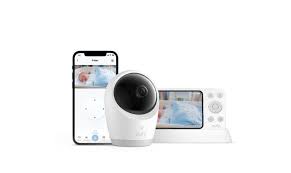
Why You Need More Than a Traditional Baby Monitor
You might be thinking, “Can’t I just get a classic audio monitor?” You could, but you’d be missing out on a world of features designed for modern parents. A dedicated smart home camera for baby monitoring bridges the gap between simple listening and true, comprehensive oversight.
Think of it this way: an audio monitor tells you if the baby is crying. A smart camera shows you why. Are they just stirring, have they lost their pacifier, or are they tangled in a blanket? This visual confirmation is priceless, saving you from unnecessary trips to the nursery that might accidentally wake them up. It’s about getting a clearer picture, literally and figuratively, of your baby’s well-being.
What Are the Main Types of Baby Monitoring Cameras?
When you start shopping, you’ll generally find two main categories. Understanding the difference is the first step to making a smart choice.
Dedicated Baby Monitor Systems
These are typically closed-circuit systems that come with a dedicated camera and a parent-unit handheld monitor.
- Pros: They are often plug-and-play, don’t rely on your home Wi-Fi (some use FHSS technology), and are incredibly simple to use.
- Cons: The range can be limited, the screen on the parent unit is often small, and you can’t check in when you’re away from home.
Wi-Fi-Enabled Smart Home Cameras
These are versatile security cameras that connect to your home Wi-Fi and stream video directly to an app on your smartphone or tablet.
- Pros: You can check in from anywhere in the world with an internet connection. They often come packed with smart features like motion alerts, cloud storage, and higher-resolution video. Plus, you can repurpose the camera for general home security once your child is older.
- Cons: They are dependent on a stable Wi-Fi connection. There are also valid privacy concerns that need to be addressed with proper security measures.
For most families today, the flexibility and advanced features of a Wi-Fi-enabled smart camera make it the superior choice for modern parenting.
Key Features to Look for in a Home Camera for Baby Monitoring
Alright, let’s get into the nitty-gritty. Not all cameras are created equal, especially when a baby’s safety is on the line. Here are the non-negotiable features you should have on your checklist.
- Excellent Video Resolution (1080p or Higher): You want to be able to see clearly. Is your baby breathing peacefully? Is that a rash on their skin? A 1080p Full HD camera provides the detail you need without ambiguity. While 4K is available, it often isn’t necessary for a nursery and can tax your Wi-Fi network.
- High-Quality Night Vision: This is absolutely critical. Your baby will spend a lot of time sleeping in the dark. Look for cameras with infrared (IR) LEDs that provide a clear black-and-white image without emitting any visible light that could disturb your baby’s sleep.
- Two-Way Audio: This feature allows you not only to hear your baby but also to talk or sing to them through the camera’s speaker. The sound of your voice can be incredibly soothing and might be all it takes to lull them back to sleep without you ever entering the room.
- Pan, Tilt, and Zoom (PTZ): Newborns don’t move much, but they grow into curious, mobile toddlers in the blink of an eye. A camera with PTZ capabilities allows you to remotely scan the entire room and zoom in, ensuring you can always keep your little escape artist in view.
- Smart Alerts (Sound & Motion Detection): A good camera won’t just stream video; it will actively listen and watch for you. Look for customizable alerts. You want to be notified when the camera detects crying, not just every little gurgle or a fan blowing the curtains. Motion detection is great for when they start trying to climb out of the crib.
- Room Environment Sensors: Some advanced models include sensors for room temperature and humidity. This is a fantastic feature for ensuring your baby’s room is always comfortable and safe, alerting you if it gets too hot or too cold.
- Secure and User-Friendly App: You’ll be using the app a lot, often in the middle of the night when you’re half-asleep. It needs to be stable, intuitive, and easy to navigate. Most importantly, it must be secure.
How to Install Your Nursery Camera for Optimal Viewing
Once you’ve chosen the perfect home camera for baby monitoring, placement is key. Here’s a simple guide to get it right.
- Choose the Right Spot: The best location is typically high up on a wall or a sturdy shelf in a corner of the room. This gives you a wide, bird’s-eye view of the entire crib without any blind spots.
- Ensure a Clear View of the Crib: Position the camera so you have an unobstructed view of your baby’s sleeping area. Double-check that no part of the crib, like a high corner post, is blocking the lens.
- Secure All Cords and Cables: This is a crucial safety step. Never place the camera within the crib or within reach of the baby. Ensure all power cords are tucked away, secured to the wall, and well out of reach to prevent any strangulation hazard. Use cord concealers if necessary.
- Connect to Wi-Fi and Test: Follow the manufacturer’s instructions to connect the camera to your home network. Before you rely on it, test the feed thoroughly. Check the video quality during the day and with the lights off to test the night vision. Test the two-way audio and the PTZ functions.
As a parent myself, my smart camera once alerted me to a rising temperature in the nursery on a hot summer night. The air conditioner had tripped its breaker. That single alert was worth the entire cost of the system. It’s not about spying; it’s about having an intelligent safety net.
Let’s Talk Privacy: Is a Wi-Fi Camera Safe?
This is the number one question we get, and it’s an important one. The idea of a camera in your baby’s room being hacked is terrifying. However, you can significantly reduce the risk by taking proactive security measures.
According to Dr. Alistair Finch, a cybersecurity specialist, “The weakest link in most smart home security setups isn’t the device itself, but human error. Using strong, unique passwords and enabling all available security features, like two-factor authentication, creates a formidable barrier against unauthorized access.”
Here’s your security checklist:
- Create a Strong, Unique Password: Do not reuse a password from another account. Use a long combination of upper and lowercase letters, numbers, and symbols.
- Enable Two-Factor Authentication (2FA): This is your single most important security feature. It means that even if someone steals your password, they can’t log in without a second code, which is typically sent to your phone.
- Keep Firmware Updated: Manufacturers regularly release updates to patch security vulnerabilities. Enable automatic updates in your camera’s app if the option is available.
- Secure Your Home Wi-Fi Network: Your camera is only as secure as the network it’s on. Ensure your router is protected with a strong WPA2 or WPA3 password.
Frequently Asked Questions
Q: Can I use a regular home security camera as a baby monitor?
A: Absolutely! Many indoor security cameras have all the key features we’ve discussed—1080p video, night vision, two-way audio, and motion/sound alerts. Using a versatile home camera for baby monitoring is often a smart, long-term investment.
Q: Do I need a camera with cloud storage?
A: While not essential for live monitoring, cloud storage is great for capturing and saving memorable moments or reviewing an event if needed. Many cameras offer a free basic plan or a local storage option via a microSD card.
Q: How much should I expect to spend?
A: A high-quality, reliable camera for baby monitoring can range from around $50 to over $250. You don’t need the most expensive model, but avoid the cheapest, no-name brands that may have questionable security and support.
Q: Can my partner and I both access the camera feed?
A: Yes, nearly all smart camera apps allow you to share access with family members. You can invite your partner, grandparents, or a trusted babysitter to view the feed through their own smartphones by creating accounts under your main profile.
Q: Will the camera work if my internet goes down?
A: This depends on the model. Most Wi-Fi cameras will stop streaming to your phone if the internet is out. Some dedicated systems with a parent unit will continue to work, as they create their own local connection. If you have unreliable internet, this is an important factor to consider.
The Ultimate Goal: Your Peace of Mind
Choosing the right technology for your home can feel overwhelming, especially when you have a new baby to care for. But finding the perfect home camera for baby monitoring is one of the most empowering decisions you can make. It’s about leveraging technology to gain reassurance, to feel connected even when you’re in another room, and to create a safer environment for the most precious person in your life. Make an informed choice, secure your device properly, and enjoy the quiet confidence that comes with knowing you always have a watchful eye on your little one.