There’s nothing quite like the peace of mind that comes from a wire-free security camera. The freedom to place it anywhere without drilling holes or running cables is a game-changer. But that freedom comes with a trade-off: the battery. It’s a frustrating moment when you realize your camera’s offline right before you leave for vacation, all because you forgot to charge it. If you’re tired of constantly climbing a ladder to swap batteries, you’ve come to the right place. As a Senior Security Solutions Expert at Family Security 247, I’m going to walk you through exactly How To Extend Home Camera Battery Life, turning your high-maintenance device into a reliable, set-it-and-forget-it guardian for your home.
This isn’t just about convenience; it’s about consistent security. A dead camera is a blind spot in your home’s defense. By making a few smart adjustments, you can ensure your eyes are always open, keeping your family and property safe around the clock.
What’s Really Draining Your Camera’s Battery?
Before we dive into the solutions, it helps to understand the culprits. Think of your camera’s battery like the gas tank in your car. Certain driving habits burn fuel faster. The same principle applies here.
Your camera’s battery is primarily drained by a few key activities:
- Frequent Motion Triggers: A camera pointed at a busy street or a tree with swaying branches will record constantly, waking up from its low-power state and draining the battery rapidly.
- Live Streaming: Watching a live feed from your phone is one of the most power-intensive things your camera can do.
- Poor Wi-Fi Connection: If your camera is far from your router, it has to work much harder to maintain a stable connection, much like your phone searching for a signal in a remote area. This constant effort is a major battery hog.
- High Video Quality Settings: Recording in 2K or 4K resolution requires more processing power and creates larger files to upload, both of which consume more energy than standard HD.
- Extreme Temperatures: Both very cold and very hot weather can negatively impact battery performance and longevity. Lithium-ion batteries just don’t like extremes.
- Night Vision: The infrared LEDs that allow your camera to see in the dark require a steady supply of power to operate.
Understanding these drains is the first step. Now, let’s take control.
Your Ultimate Guide on How to Extend Home Camera Battery Life
Let’s get practical. Here are the most effective strategies, from simple setting tweaks to smart hardware additions, that we recommend to our clients at Family Security 247 every day.
1. Optimize Your Motion Detection Settings
This is, without a doubt, the most impactful change you can make. Your goal is to record what matters and ignore what doesn’t.
- Adjust Sensitivity: Almost all modern cameras allow you to adjust motion sensitivity. If you’re getting alerts for every passing car or falling leaf, your sensitivity is too high. Lower it to a level that still catches a person walking up to your door but ignores background noise.
- Create Activity Zones: This feature is a lifesaver. You can draw specific zones within the camera’s view where you want it to detect motion. For a front door camera, you could draw a box around your walkway and porch, telling the camera to completely ignore the street and sidewalk. No more false alerts, and a whole lot more battery life.
- Use Smart Detection: Many newer cameras can differentiate between people, vehicles, and animals. If your primary concern is human intruders, set the camera to only trigger alerts and recordings for people. This will stop your battery from draining every time the neighbor’s cat wanders through your yard.
2. Tweak Your Video and Recording Settings
You don’t always need to record in cinematic 4K. Finding the right balance between clarity and efficiency is key.
- Lower the Resolution: Does your camera overlooking the backyard really need to be in 2K? Often, 1080p or even 720p is more than sufficient to identify a person or event clearly. Test different settings to see what works for your needs.
- Shorten Recording Clip Length: Set your camera to record for a shorter duration after motion is detected, such as 15 or 30 seconds instead of a full minute. This captures the critical moment without unnecessarily draining the battery with prolonged recording.
3. Ensure a Rock-Solid Wi-Fi Connection
This is a silent battery killer that many people overlook. A camera constantly struggling to connect to your Wi-Fi is a camera that will die quickly.
“Think of a weak Wi-Fi signal as a constant headwind for your camera’s battery,” notes David Chen, a leading smart home technology analyst. “The device has to ‘shout’ to be heard by the router, and that shouting takes a tremendous amount of energy. Improving your signal is one of the best investments for battery health.”
Check the Wi-Fi signal strength in your camera’s app. If it’s weak (one or two bars), consider moving your router closer or investing in a Wi-Fi extender or mesh system. A strong, stable signal allows the camera to transmit data quickly and efficiently, then go back to sleep.
4. Position Your Camera Strategically
Where you place your camera matters just as much as its settings.
- Avoid High-Traffic Areas: Don’t point your camera directly at a busy street, a waving flag, or a rustling tree. Angle it to focus only on the area you want to protect, like your driveway or entryway.
- Protect it from the Elements: If possible, place the camera under an eave or overhang. This not only protects it from rain and snow but also shields it from direct sunlight on hot days and provides some insulation in the cold, helping to regulate its temperature and preserve battery performance.
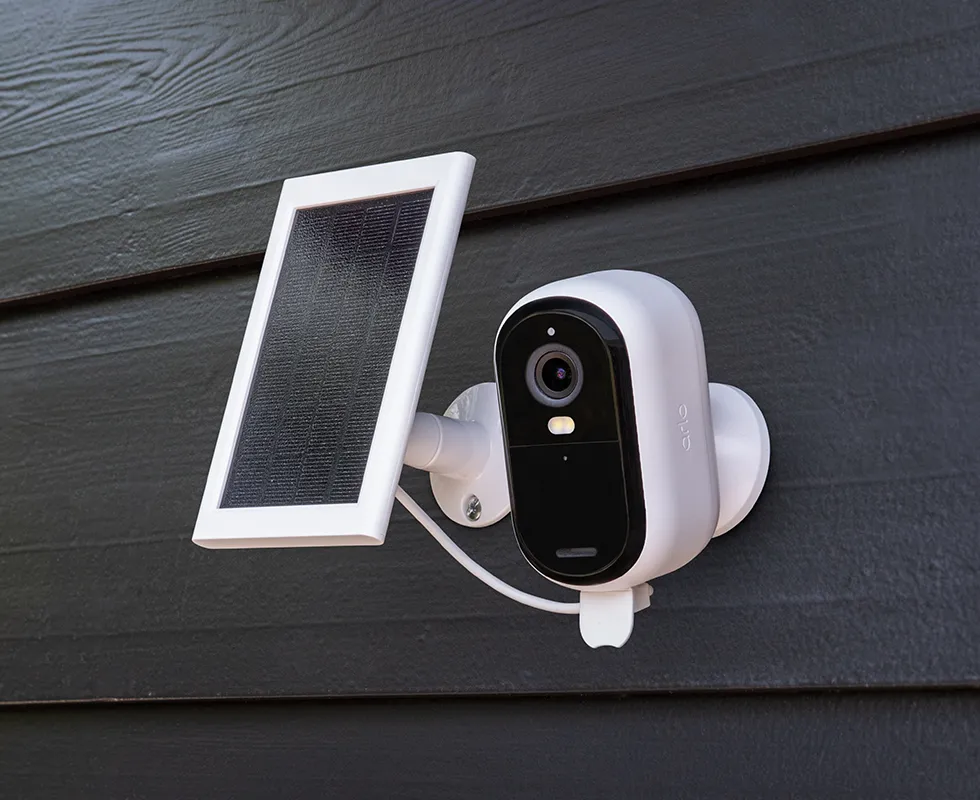
5. Go Solar: The Ultimate Set-and-Forget Solution
For outdoor cameras, a solar panel accessory is the single best investment you can make for battery life. It’s a total game-changer.
A small, dedicated solar panel connects directly to your camera and, with just a few hours of direct sunlight each day, can provide enough trickle charge to keep the battery topped off indefinitely. You may never have to manually charge your camera again. When choosing one, make sure it’s fully compatible with your camera’s make and model to ensure proper voltage and connection.
Is a Wired Camera a Better Option for You?
While we’re talking about how to extend home camera battery life, it’s also important to ask if a battery-powered camera is the right tool for the job in the first place. For certain high-traffic, critical locations, a wired option might be the smarter long-term choice.
Here’s a quick comparison:
| Feature | Battery-Powered Cameras | Wired (Plug-in or PoE) Cameras |
|---|---|---|
| Installation | Extremely easy, no drilling required. | More complex, may require drilling and running cables. |
| Placement | Highly flexible, can be placed anywhere with Wi-Fi. | Limited by proximity to a power outlet or Ethernet port. |
| Power | Relies on a rechargeable battery. | Constant, uninterrupted power. |
| Recording | Typically records short clips on motion detection. | Can offer 24/7 continuous recording options. |
| Best For | Areas with occasional traffic, easy setup is a priority. | High-traffic areas like front doors, driveways, main rooms. |
For a critical spot like your front door, a wired video doorbell or a plug-in camera might provide more robust security without any battery anxiety. You can find excellent options for both in our [guide to the best home security cameras of the year].
Frequently Asked Questions
Q: How long should a home security camera battery last on a single charge?
A: This varies widely by brand, usage, and settings. A good quality camera should last anywhere from 1 to 6 months per charge under typical conditions. If yours is lasting less than a month, it’s time to implement the tips in this guide.
Q: Does night vision use a lot of battery?
A: Yes, it does. The infrared (IR) LEDs that illuminate the dark for the camera sensor require continuous power. If your camera is in a location that is dark for many hours, expect the battery to drain faster than it would in a well-lit area.
Q: Can a weak Wi-Fi signal really affect battery life that much?
A: Absolutely. It’s one of the top hidden causes of rapid battery drain. The camera’s Wi-Fi radio has to boost its power output significantly to send and receive data from a distant router, consuming a lot of energy in the process.
Q: Is it okay to leave my battery-powered camera plugged in all the time?
A: Generally, yes. Modern cameras have charge controllers that prevent overcharging. However, if the camera isn’t designed for permanent outdoor plugged-in use, ensure the connection is protected from weather to avoid damage. A solar panel is a much safer and more elegant solution for outdoor charging.
Your Peace of Mind is Worth It
Learning how to extend home camera battery life is about more than just saving yourself a chore. It’s about ensuring the security system you invested in is actually working when you need it most. By taking a few minutes to optimize your settings, improve your Wi-Fi, and choose the right location, you can dramatically increase the time between charges.
At Family Security 247, we believe that feeling safe at home should be simple. With these adjustments, you can enjoy the convenience of your wire-free camera without the constant worry, knowing your home is protected day and night.