Thinking about beefing up your home security? Smart move. In today’s world, a little extra peace of mind goes a long way. But once you start shopping, you’re hit with a wall of choices. The first, and most important, fork in the road is deciding between cameras designed for inside your home and those built for the great outdoors. That’s where a solid Indoor Vs Outdoor Home Camera Comparison becomes your best friend. It’s not just about where you place it; it’s about choosing the right tool for the right job to keep your family and property safe. Let’s break it down, cut through the jargon, and figure out exactly what you need.
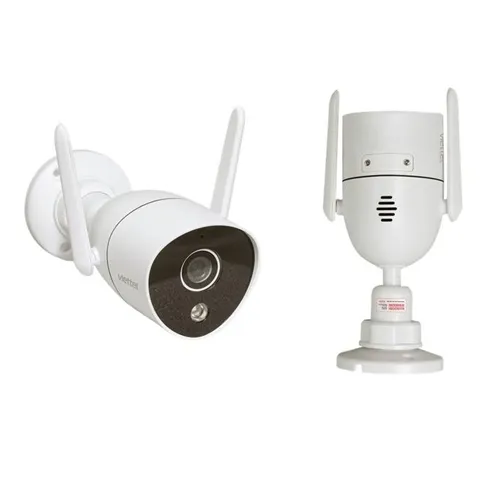
What’s The Real Difference? More Than Just Location
At first glance, it seems simple: one goes inside, one goes outside. But the engineering and features that differentiate them are worlds apart. Think of it like choosing between a pair of slippers and a pair of hiking boots. Both are footwear, but you wouldn’t wear slippers to climb a mountain.
Durability and Weatherproofing: The Outdoor Warrior
This is the single biggest differentiator. An outdoor camera is built like a tiny tank. It has to stand up to everything Mother Nature throws at it: blistering summer heat, freezing winter nights, torrential rain, and dust storms.
- IP Ratings: You’ll see codes like “IP65” or “IP67.” This isn’t just tech-speak. The “IP” stands for Ingress Protection. The first number (e.g., the ‘6’) rates its protection against solids like dust, and the second number (e.g., the ‘5’ or ‘7’) rates its protection against liquids like rain and snow. A higher number means better protection. An outdoor camera must have a solid IP rating.
- Temperature Tolerance: These cameras are designed to operate in a wide range of temperatures, often from -20°C (-4°F) up to 50°C (122°F) or more. An indoor camera would simply shut down or get damaged in those extremes.
Design and Aesthetics: The Indoor Diplomat
While an outdoor camera is designed to be a visible deterrent, an indoor camera is all about subtlety. It needs to blend in with your home decor.
- Size and Shape: Indoor cameras are typically smaller, sleeker, and more discreet. They come in various designs that can sit on a bookshelf, mount in a corner, or even be disguised as another object.
- Color and Finish: You’ll find them in whites, blacks, and grays with matte finishes that don’t draw the eye. The goal is for you to forget it’s even there until you need it.
Power Source: Cords vs. Cords-Free
How a camera gets its juice is a major factor.
- Indoor Cameras: Most are plug-in models. Outlets are plentiful indoors, so a consistent power source is easy to come by. This means you never have to worry about a dead battery.
- Outdoor Cameras: This is where you have more options. You can find wired models (which require drilling and more complex installation but offer constant power) and, increasingly popular, battery-powered or solar-powered models. These offer incredible placement flexibility, as you don’t need an outlet nearby.
Field of View and Night Vision
What the camera can see, and how well it sees in the dark, differs based on its intended environment.
- Outdoor: These often have a wider field of view to cover a large area like a backyard or driveway. Their night vision also needs to be more powerful, using stronger infrared (IR) LEDs to illuminate objects from much further away, sometimes up to 30 meters (100 feet).
- Indoor: The field of view might be slightly narrower, designed to monitor a single room. The night vision is effective but tailored for smaller, enclosed spaces.
Key Features to Consider in Any Home Camera
Whether you’re looking inside or out, there are some non-negotiable features that define a quality security camera in 2024.
- Video Resolution: Aim for 1080p (Full HD) at a minimum. This gives you clear, usable footage. 2K or 4K resolutions offer even more detail, which can be crucial for identifying faces or license plates.
- Two-Way Audio: A built-in microphone and speaker are incredibly useful. You can listen in, talk to family members or pets, or even warn off a potential intruder.
- Motion Detection & Smart Alerts: A good camera doesn’t just record; it’s smart. It should send an alert to your phone when it detects motion. Advanced models use AI to differentiate between people, animals, and vehicles, reducing false alarms from swaying trees.
- Storage Options: Where is your video saved?
- Local Storage: A microSD card right in the camera. You control the footage, and there’s no monthly fee.
- Cloud Storage: Your recordings are uploaded to a secure server. You can access them from anywhere, and they’re safe even if the camera is stolen. This usually requires a subscription.
An In-Depth Indoor vs Outdoor Home Camera Comparison Table
For a quick “at-a-glance” overview, here’s a simple table to sum up the key points of our indoor vs outdoor home camera comparison.
| Feature | Indoor Security Camera | Outdoor Security Camera |
|---|---|---|
| Best For | Monitoring rooms, kids, pets, and main entry points. | Monitoring property lines, driveways, yards, and porches. |
| Durability | Low. Not designed for exposure to elements. | High. Weatherproof and dustproof (IP65+ rating). |
| Design | Discreet, compact, and aesthetically pleasing. | Robust, often larger, and designed to be a deterrent. |
| Power Options | Primarily plug-in (wired). | Wired, battery-powered, or solar-powered. |
| Typical Price Range | More affordable. | Generally more expensive due to rugged construction. |
| Key Feature | Pan-and-tilt functions, sleek design. | Powerful night vision, weather resistance, wider view. |
Can I Use an Indoor Camera Outside?
This is a question we hear all the time at Family Security 247, and the short answer is a firm no. An indoor camera is simply not built to survive outdoors. The first rainstorm or cold snap could permanently damage its internal components. The lens can fog up, moisture can short-circuit the electronics, and the warranty will be instantly voided. It’s a risk that is absolutely not worth taking.
On the flip side, can you use an outdoor camera inside? Yes, you can. It will work perfectly fine, but it’s often overkill. It will be bulkier, more expensive, and more conspicuous than an indoor model designed for the same job.
Your Privacy Matters: Securing Your Security Cameras
Bringing a camera into your home requires trust. It’s crucial to protect your devices from unauthorized access. Your digital security is just as important as your physical security.
“Treat the password to your home camera network with the same seriousness as the key to your front door. In the digital age, they can both grant access to your most private space.” – Dr. Alistair Finch, Cybersecurity Analyst
Here are a few essential steps to keep your cameras secure:
- Create a Strong, Unique Password: Don’t use “password123.” Use a long combination of upper and lowercase letters, numbers, and symbols.
- Enable Two-Factor Authentication (2FA): This adds a second layer of security, usually a code sent to your phone, making it much harder for someone to log in even if they steal your password.
- Keep Firmware Updated: Manufacturers release updates to patch security vulnerabilities. Enable automatic updates if the option is available. Learn more about how to secure your smart home devices.
- Secure Your Wi-Fi Network: Your camera is only as secure as the network it’s on. Ensure your home Wi-Fi has a strong password and uses WPA2 or WPA3 encryption.
Frequently Asked Questions (FAQ)
Q: What is a good resolution for a home security camera?
A: 1080p (Full HD) is the standard for good, clear video. However, 2K or 4K resolution provides superior detail, which can be critical for zooming in on distant objects or identifying faces, making it a worthwhile upgrade if your budget allows.
Q: Do outdoor security cameras need to be connected to Wi-Fi?
A: Most modern outdoor cameras are Wi-Fi-based for easy access and smart features. However, there are options that use cellular data (like 4G LTE) for remote locations without Wi-Fi, and some wired systems record to a local DVR/NVR without needing an internet connection for basic recording.
Q: How much does cloud storage for security cameras typically cost?
A: Costs vary by brand and plan, but you can typically expect to pay between $3 to $10 per month per camera for plans that store video clips for 30 to 60 days. Some brands offer a free basic plan with very limited storage.
Q: Are battery-powered outdoor cameras reliable?
A: Yes, they have become very reliable. Battery life can range from a few months to over a year on a single charge, depending on usage and settings. For ultimate convenience, consider pairing a battery-powered camera with a small solar panel to eliminate the need for manual recharging.
Q: Can home security cameras record 24/7?
A: Some cameras, particularly wired ones, offer continuous 24/7 recording. However, many battery-powered models are designed to record only when motion is detected to conserve power. Which one is better depends on your specific security needs.
The Final Verdict
Choosing between an indoor and outdoor camera isn’t about which one is “better”—it’s about which one is right for the space you need to protect. Outdoor cameras are your tough, vigilant sentinels, while indoor cameras are your discreet, observant guardians. The most effective home security strategy often involves a combination of both, creating a comprehensive safety net.
By understanding the core differences outlined in this indoor vs outdoor home camera comparison, you’re now equipped to assess your home’s unique vulnerabilities and make an informed decision. The goal isn’t just to buy a camera; it’s to invest in the peace of mind that comes from knowing your home is protected, inside and out.