Let’s be real for a moment. That strange noise you heard downstairs last night? The anxiety of not knowing if your package was delivered safely? We’ve all been there. In a world where peace of mind is priceless, a reliable set of eyes on your home isn’t a luxury anymore; it’s a necessity. That’s where this in-depth Ring Home Camera Review comes in. As a security expert who has installed and tested countless devices, I’m here to cut through the marketing noise and give you the straight scoop on whether Ring is the right choice to protect your family and property. We’re going to break down everything from video quality to those tricky subscription plans, so you can make a decision with confidence.
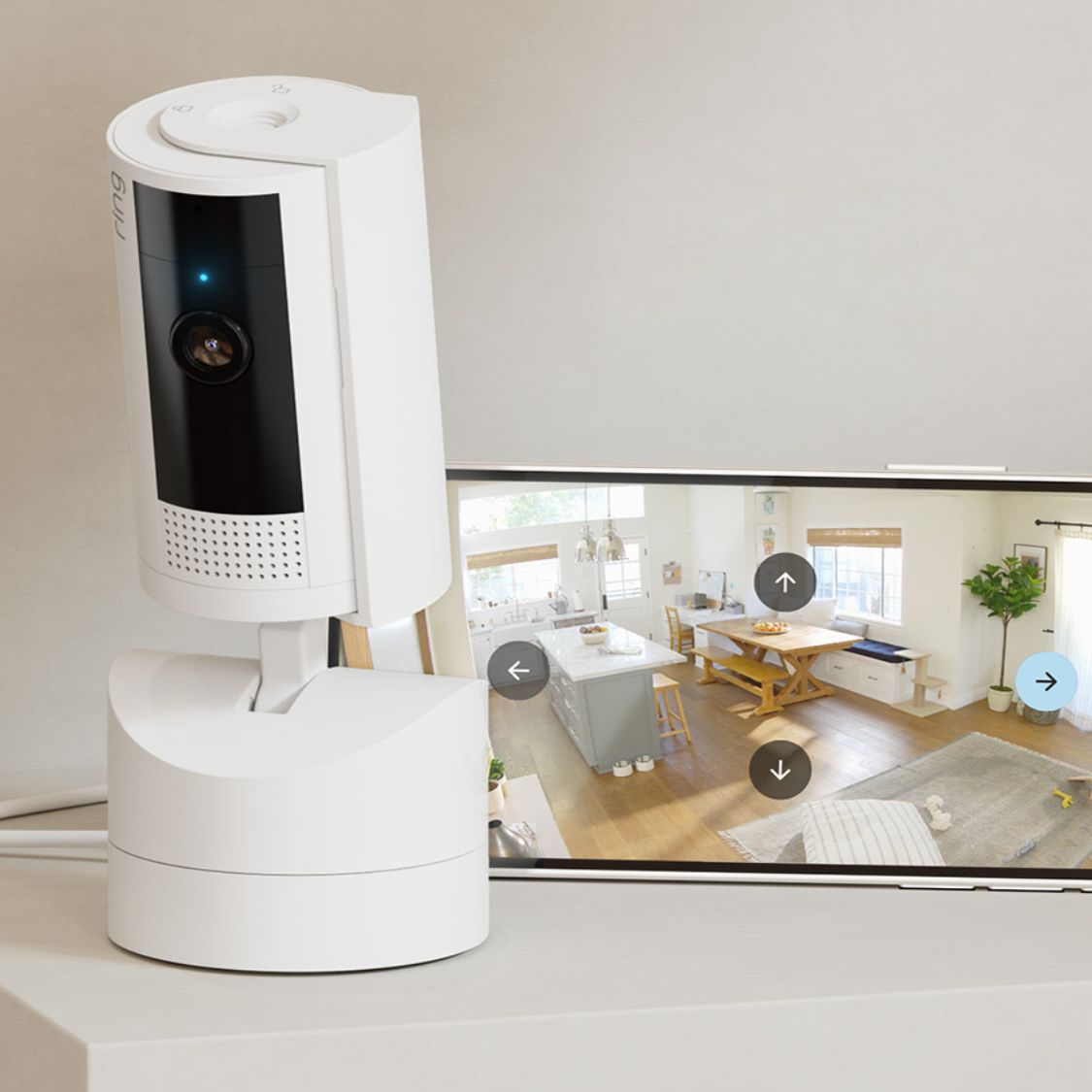
Why Do You Even Need a Home Camera?
Before we dive into the specifics of Ring, let’s tackle a fundamental question I get all the time: “Is a home camera really worth it?” The answer is a resounding yes, and it goes far beyond just catching a potential burglar.
Think of it as your personal lookout. A modern security camera is your tool for:
- Deterring Crime: Often, the mere sight of a camera is enough to make a potential intruder think twice and move on to an easier target. It’s proactive, not just reactive, security.
- Checking In on Loved Ones: Whether it’s making sure the kids got home from school safely, keeping an eye on an elderly parent, or seeing what mischief your pets are up to, a camera connects you to your home when you’re away.
- Evidence Collection: In the unfortunate event of a break-in or porch piracy, having clear video footage is invaluable for police reports and insurance claims. It changes the conversation from “what I think happened” to “here is exactly what happened.”
In my years of experience, I’ve seen cameras help homeowners identify everything from a sneaky raccoon raiding the trash to a contractor who wasn’t being honest about their work hours. The value is in the certainty and control it gives you over your own domain.
An In-Depth Ring Home Camera Review: What Sets It Apart?
Ring, an Amazon-owned company, has become a household name in home security. But what are you actually getting when you buy one of their cameras? It’s not just a piece of hardware; it’s an entry into a connected security ecosystem.
The Ring Ecosystem: More Than Just a Camera
The biggest strength of Ring is how seamlessly its products work together. You can start with a single Indoor Cam and later add a Video Doorbell, outdoor Floodlight Cams, and even the Ring Alarm system. They all integrate into a single, user-friendly app on your phone. This means you can view all your cameras, get motion alerts, and even arm your alarm system from one central place. It’s this unified experience that many users find incredibly compelling.
Video Quality: Can You Actually See What’s Happening?
Let’s talk specs. Most modern Ring cameras offer 1080p HD resolution. Is this 4K? No, but for security purposes, it’s the sweet spot. It’s clear enough to identify faces and read license plates from a reasonable distance without creating massive video files that clog your Wi-Fi network. Many models also include features like:
- HDR (High Dynamic Range): This helps balance out the lighting in tricky situations, like a bright, sunny background with a shadowed porch, so you don’t lose detail.
- Color Night Vision: On models with a built-in light (like the Spotlight and Floodlight Cams), you get full-color video even at night, which is a game-changer for identification. Standard infrared night vision provides a clear black-and-white image on other models.
Smart Features That Actually Matter
A camera is only as good as its brain. Ring packs its devices with smart features that make a real difference:
- Customizable Motion Zones: This is a must-have. You can literally draw boxes on your screen to define the specific areas you want the camera to monitor. This is perfect for ignoring passing cars on the street and only getting alerted when someone steps onto your driveway.
- Two-Way Talk: See the delivery driver at your door? You can speak to them directly through the app. It’s also a powerful deterrent—nothing spooks a potential thief more than a voice coming out of a “lifeless” camera.
- Live View: You can tap into a live video feed from any of your cameras at any time, from anywhere in the world, as long as you have an internet connection.
The Ring Protect Plan: To Subscribe or Not to Subscribe?
This is the big one, and where many people get confused. Can you use a Ring camera without a subscription? Yes, you can. Without a plan, you still get motion-activated notifications and can use Live View.
However, if you want to record, save, and share video clips, you need a Ring Protect subscription.
Without the subscription, you get the alert that motion was detected, but you can’t go back and see what caused it. It’s like your smoke alarm telling you there was a fire yesterday.
The basic plan is quite affordable (typically a few dollars per month per device) and unlocks video history for up to 180 days. For most people, it’s an essential part of the experience and, in my opinion, well worth the small investment.
|
Our Picks for the Best Home Camera in 2026
As an Amazon Associate, we earn from qualifying purchases.
|
||
| Num | Product | Action |
|---|---|---|
| 1 | TP-Link Tapo Pan/Tilt Security Camera for Baby Monitor, Pet Camera w/Motion Detection, 1080P, 2-Way Audio, Night Vision, Cloud & SD Card Storage, Works with Alexa & Google Home (Tapo C200) |

|
| 2 | Kasa Smart Indoor Pan-Tilt Home Security Camera, 1080p HD Dog Camera w/Night Vision, Motion Detection for Baby & Pet Monitor, Cloud & SD Card Storage, Works w/ Alexa & Google Home, 2.4G WiFi (EC71) |
|
| 3 | Ring Battery Doorbell | Home or business security with Head-to-Toe Video, Live View with Two-Way Talk, and Motion Detection & Alerts (newest model), Venetian Bronze |
|
| 4 | WYZE Cam v4 (Latest Model), 2.5K AI Security Camera, Indoor/Outdoor Cameras for Home Security, Baby Monitor & Pet Camera, Vibrant Color Night Vision, No Subscription Required, Free Expert Help |
|
| 5 | Blink Mini 2 — Home Security & Pet Camera(s) with HD video, color night view, motion detection, two-way audio, and built-in spotlight — 1 camera (Black) |
|
| 6 | WYZE Cam Pan v3, Indoor/Outdoor IP65-Rated 1080p Pan/Tilt/Zoom Wi-Fi Smart Home Security Camera with Color Night Vision, 2-Way Audio, Compatible with Alexa & Google Assistant, Free Expert Setup |
|
| 7 | TP-Link Tapo 2K Pan/Tilt Security Camera for Baby Monitor, Dog Camera w/Motion Detection, 2-Way Audio, Siren, Night Vision, Cloud & SD Card Storage, Works with Alexa & Google Home, 2-Pack (C210P2) |
|
| 8 | Tapo TP-Link 1080P Indoor Security Camera for Baby Monitor, Dog Camera w/Motion Detection, 2-Way Audio Siren, Night Vision, Cloud & SD Card Storage, Works w/Alexa & Google Home C100 |
|
| 9 | Ring Outdoor Cam (Stick Up Cam) | Weather-Resistant Outdoor Camera, Live View, Color Night Vision, Two-Way Talk, Motion alerts, Works with Alexa | White |
|
| 10 | 2K Cameras for Home Security-Outdoor/Indoor Camera for Dog/Cat/Pet/Nanny/Baby, Color Night Vision, White Light, Siren, 24/7 SD Recordings, Works with Alexa/Google Home, C1 (C1-White-2pack-2.4G) |
|
How Do I Install a Ring Camera?
One of the reasons for Ring’s popularity is its focus on DIY installation. While specifics vary by model, the general process is refreshingly simple.
- Charge the Battery (If Applicable): For battery-powered models like the Stick Up Cam Battery, make sure the battery pack is fully charged before you begin.
- Download the Ring App: Get the app on your smartphone and create an account.
- Scan the QR Code: The app will prompt you to scan a small QR code on the camera itself. This is how it instantly identifies the device.
- Connect to Wi-Fi: Follow the in-app instructions to connect the camera to your home Wi-Fi network. Pro tip: Make sure you have a strong Wi-Fi signal where you plan to mount the camera!
- Mount the Camera: Use the included hardware to mount the camera. Aim for a high vantage point that covers key entryways but is out of easy reach. The app’s Live View will help you find the perfect angle before you drill any holes.
What About Privacy Concerns with Ring?
It’s impossible to have a complete Ring home camera review without addressing privacy. It’s a valid and important concern. Ring has faced scrutiny in the past, but they have since implemented several key security features to give users more control.
As cybersecurity analyst Dr. Eleanor Vance often states, “The weakest link in any smart home device is often the user’s password. A strong, unique password for your Ring account and enabling two-factor authentication are the two most critical steps you can take to secure your cameras.”
Here’s how you can protect your privacy:
- Enable End-to-End Encryption: This is a crucial, optional setting in the app that ensures only your enrolled mobile device can view your videos.
- Use Two-Factor Authentication (2FA): This adds an extra layer of security to your account, requiring a code from your phone to log in.
- Manage Shared Users: Be mindful of who you give access to your cameras and review these permissions regularly.
- Privacy Zones: You can black out certain areas in the camera’s field of view (like a neighbor’s window) to prevent them from being recorded.
Frequently Asked Questions (FAQ)
Q: Do Ring cameras record 24/7?
A: No, most Ring cameras are motion-activated to conserve battery and data. They record short clips when they detect movement. Some powered models offer a “snapshot capture” feature that takes photos at set intervals to provide a more continuous timeline.
Q: How long do the batteries last on Ring cameras?
A: Battery life varies greatly depending on usage, motion settings, and weather. On average, you can expect anywhere from a few weeks to a few months on a single charge. For high-traffic areas, consider a wired model or a solar panel accessory.
Q: Can Ring cameras be hacked?
A: Any internet-connected device is potentially vulnerable. However, by using a strong, unique password, enabling two-factor authentication, and turning on end-to-end encryption, you can make your Ring account and cameras extremely secure.
Q: Do Ring cameras work with Google Home?
A: Ring is owned by Amazon, so its primary integration is with Amazon Alexa. You can get announcements on Echo devices and view camera feeds on an Echo Show. Functionality with Google Home is very limited or nonexistent.
Q: What is the effective range of a Ring camera’s motion detection?
A: The effective range is typically up to 30 feet (about 9 meters). You can adjust the sensitivity in the app to fine-tune its performance and reduce false alerts.
The Final Verdict
So, after this comprehensive Ring home camera review, what’s the takeaway? Ring offers a powerful, user-friendly, and highly expandable security system that is an excellent choice for the average homeowner. The hardware is solid, the app is intuitive, and the ecosystem is a major selling point. While the subscription is necessary to unlock its full potential and privacy is something you must actively manage, the peace of mind and security it delivers are undeniable. Choosing the right camera is the first step toward creating a safer, smarter home for you and your family.