If you’re reading this Wifi Home Camera Review, chances are you’re looking for more than just a piece of tech. You’re looking for peace of mind. That feeling of being able to glance at your phone and know that your home, your family, and even your mischievous pet are safe and sound. But let’s be real, the market is flooded with options, jargon, and promises that can make your head spin. My goal here, as a senior security expert at Family Security 247, is to cut through that noise. We’re going to break it all down, step-by-step, so you can make a choice you feel confident about.
Why Do You Really Need a Home Camera?
Before we dive into the tech, let’s talk about the why. For many, the first thought is deterring burglars, and that’s a huge benefit. A visible camera is a powerful deterrent. But the day-to-day value often comes from the little things. I can’t tell you how many times my own camera has saved the day, not from a break-in, but by letting me see that a long-awaited package was delivered safely or by letting me check in on my elderly mother who lives alone.
A modern WiFi camera is a multi-tool for modern life. It’s a:
- Pet Sitter: Wondering if your dog is tearing up the new couch? Now you know. Some cameras even let you talk to them (or, you know, yell “Get off the couch!”).
- Nanny Cam: Keep a loving eye on your little ones and the person caring for them, ensuring everyone is safe and happy.
- Package Protector: Get instant alerts when a delivery arrives and watch over it until you get home.
- Everyday Reassurance: Did you forget to close the garage door? Is that strange noise just the wind? A quick look at your phone can put those nagging worries to rest.
The Lowdown on Home Camera Types
Not all cameras are created equal. They generally fall into a few key categories, each designed for a different job. Think of it like choosing the right shoes for the occasion—you wouldn’t wear hiking boots to a wedding.
Indoor Cameras
These are your eyes and ears inside the home. They’re typically smaller, more discreet, and designed to blend in with your decor. They’re perfect for monitoring main living areas, entryways, or a child’s playroom. Most plug into a wall outlet, so you never have to worry about batteries.
Outdoor Cameras
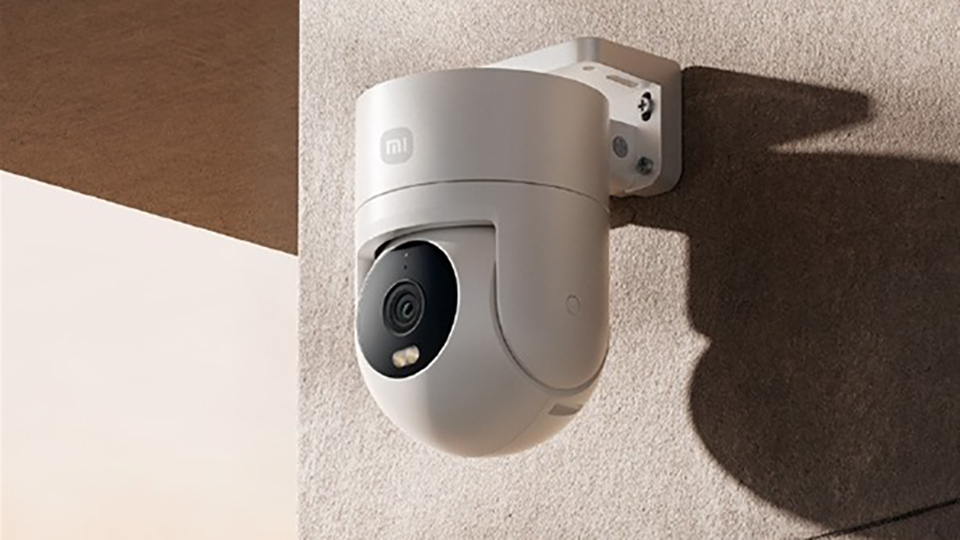
Built to withstand the elements, these are your frontline defenders. They need to be weatherproof (look for an “IP rating” like IP65 or higher) and durable. They often have more powerful night vision and a wider field of view to cover driveways, backyards, and front porches. They come in both wired and battery-powered versions, offering flexibility in placement.
Doorbell Cameras
A superstar in the world of home security. A doorbell camera replaces your existing doorbell and gives you a live view of who’s at your door, whether you’re on the couch or on vacation. It’s a fantastic way to screen visitors, communicate with delivery drivers, and capture any activity on your front step.
Key Features to Look For: Don’t Get Lost in the Specs
This is where people get overwhelmed. Let’s simplify it. Here are the features that actually matter in a good wifi home camera review.
- Video Resolution: You’ll see terms like 1080p, 2K, and 4K. For most homes, 1080p (Full HD) is the sweet spot. It provides clear, detailed video without eating up too much internet bandwidth or storage space. 2K or 4K is a great “nice to have” if you want to be able to zoom in on details like license plates from a distance.
- Night Vision: This is non-negotiable. Most cameras use infrared (IR) LEDs for black-and-white night vision. Some higher-end models now offer “color night vision,” which uses ambient light or a small spotlight to produce a full-color image, making it much easier to identify details.
- Field of View (FoV): This is how wide an angle the camera can see, measured in degrees. A wider FoV (say, 130 degrees or more) means you can cover more of a room with a single camera.
- Two-Way Audio: This is a game-changer. It’s not just about hearing what’s going on; it’s about being able to speak through the camera’s built-in speaker. You can tell the delivery driver where to leave a package or startle a would-be intruder.
- Motion Detection & Smart Alerts: A dumb camera records everything. A smart camera records what matters. Look for cameras that can distinguish between people, animals, vehicles, and general motion. This drastically reduces the number of false alarms you get from a tree swaying in the wind.
- Storage Options: Where does your video go? You have two main choices:
- Local Storage: A microSD card plugs directly into the camera. It’s a one-time purchase with no monthly fees, but if the camera is stolen, you lose the footage.
- Cloud Storage: Your footage is uploaded to the internet and stored securely on a server. It’s accessible from anywhere and safe from theft, but it usually requires a monthly subscription fee. Many people use a hybrid of both.
Your Ultimate WiFi Home Camera Review and Setup Guide
You’ve picked a camera—congratulations! Now, the fun part. Honestly, setup has become incredibly simple over the years. You don’t need to be a tech wizard.
- Find the Perfect Spot: For indoor cameras, a high corner of a room offers the best vantage point. For outdoor cameras, place them high enough to be out of easy reach (about 8-10 feet up) and angle them down to cover entry points.
- Power It Up: Plug it in or, for battery models, make sure it’s fully charged. Most will have an indicator light to show they’re ready.
- Download the App: Every camera has a companion smartphone app. Go to your phone’s app store, search for the brand name, and download it.
- Connect to Your WiFi: The app will guide you through this. It usually involves scanning a QR code on the camera and entering your home WiFi password. This is the most critical step.
- Customize Your Settings: This is where you make the camera work for you. Set up motion detection zones (e.g., ignore the busy sidewalk but watch your walkway), schedule when the camera should be active, and adjust alert sensitivity.
|
Our Picks for the Best Home Camera in 2026
As an Amazon Associate, we earn from qualifying purchases.
|
||
| Num | Product | Action |
|---|---|---|
| 1 | TP-Link Tapo Pan/Tilt Security Camera for Baby Monitor, Pet Camera w/Motion Detection, 1080P, 2-Way Audio, Night Vision, Cloud & SD Card Storage, Works with Alexa & Google Home (Tapo C200) |

|
| 2 | 2K Cameras for Home Security-Outdoor/Indoor Camera for Dog/Cat/Pet/Nanny/Baby, Color Night Vision, White Light, Siren, 24/7 SD Recordings, Works with Alexa/Google Home, C1 (C1-White-2pack-2.4G) |
|
| 3 | Kasa Smart Indoor Pan-Tilt Home Security Camera, 1080p HD Dog Camera w/Night Vision, Motion Detection for Baby & Pet Monitor, Cloud & SD Card Storage, Works w/ Alexa & Google Home, 2.4G WiFi (EC71) |
|
| 4 | WYZE Cam Pan v3, Indoor/Outdoor IP65-Rated 1080p Pan/Tilt/Zoom Wi-Fi Smart Home Security Camera with Color Night Vision, 2-Way Audio, Compatible with Alexa & Google Assistant, Free Expert Setup |
|
| 5 | Ring Battery Doorbell | Home or business security with Head-to-Toe Video, Live View with Two-Way Talk, and Motion Detection & Alerts (newest model), Venetian Bronze |
|
| 6 | Tapo TP-Link 1080P Indoor Security Camera for Baby Monitor, Dog Camera w/Motion Detection, 2-Way Audio Siren, Night Vision, Cloud & SD Card Storage, Works w/Alexa & Google Home C100 |
|
| 7 | WYZE Cam v4 (Latest Model), 2.5K AI Security Camera, Indoor/Outdoor Cameras for Home Security, Baby Monitor & Pet Camera, Vibrant Color Night Vision, No Subscription Required, Free Expert Help |
|
| 8 | TP-Link Tapo 2K Pan/Tilt Security Camera for Baby Monitor, Dog Camera w/Motion Detection, 2-Way Audio, Siren, Night Vision, Cloud & SD Card Storage, Works with Alexa & Google Home, 2-Pack (C210P2) |
|
| 9 | Ring Outdoor Cam (Stick Up Cam) | Weather-Resistant Outdoor Camera, Live View, Color Night Vision, Two-Way Talk, Motion alerts, Works with Alexa | White |
|
| 10 | Blink Mini 2 — Home Security & Pet Camera(s) with HD video, color night view, motion detection, two-way audio, and built-in spotlight — 1 camera (Black) |
|
Let’s Talk Privacy: Securing Your Security Camera
A tool meant to provide security shouldn’t create a new vulnerability. Securing your camera is just as important as choosing it. It’s a responsibility we at Family Security 247 take very seriously.
“Your home security camera is only as strong as its weakest link, and that is almost always the password. Using a long, unique password and enabling two-factor authentication is the single most important thing you can do to protect your privacy.” – Dr. Evelyn Reed, Cybersecurity Analyst
Here are your must-dos:
- Create a Strong, Unique Password: Don’t reuse your email password. Use a mix of upper and lowercase letters, numbers, and symbols.
- Enable Two-Factor Authentication (2FA): This is your best defense. It means that even if someone steals your password, they can’t log in without a second code, usually sent to your phone. If a camera brand doesn’t offer 2FA, I’d recommend looking elsewhere.
- Keep Firmware Updated: The manufacturer will release updates to patch security holes and add features. Always install them promptly through the app.
- Secure Your Home WiFi: Your camera connects to your WiFi network, so make sure your router itself has a strong password.
Integrating with Your Smart Home Ecosystem
If you already use smart home devices like Amazon Alexa or Google Assistant, look for a camera that plays well with others. This integration unlocks a new level of convenience. You can simply say, “Hey Google, show me the backyard camera” to see a live feed on your smart display, or create routines where your lights turn on automatically when your outdoor camera detects motion at night. It turns individual gadgets into a truly smart, connected security system.
Frequently Asked Questions
Q: Do WiFi cameras use a lot of internet bandwidth?
A: They use bandwidth primarily when you are live-viewing the stream or when they upload a motion-triggered clip to the cloud. On standby, the usage is minimal. Most modern home internet plans can handle several cameras without any issues.
Q: Can I view my camera when I’m not at home?
A: Absolutely! That’s one of the biggest benefits. As long as your camera is connected to your home WiFi and your phone has an internet connection (cellular or WiFi), you can view your live feed and recordings from anywhere in the world.
Q: Do home cameras record 24/7?
A: Some do, but most are designed to record only when motion is detected. This saves a massive amount of storage space and makes it much easier to find important events without scrubbing through hours of empty footage.
Q: How long do the batteries last on wireless cameras?
A: This varies widely by brand, usage, and settings, but you can typically expect anywhere from 2 to 6 months on a single charge for most popular models. Features like high-resolution streaming and frequent motion events will drain the battery faster.
Q: Is a cloud subscription necessary for a wifi home camera?
A: Not always. Many cameras offer local storage via a microSD card, which avoids monthly fees. However, a cloud subscription provides the off-site backup security that your footage is safe even if the camera is damaged or stolen.
Your Home, Your Peace of Mind
At the end of the day, a WiFi home camera is an investment in tranquility. It’s about empowering you with the knowledge that your sanctuary is protected. The technology is amazing, but its true purpose is to serve that simple, human need for safety and security. By understanding the key features, respecting the privacy implications, and choosing a device that fits your lifestyle, you’re not just buying a camera; you’re buying confidence. Hopefully, this wifi home camera review has given you the clarity and knowledge you need to make the best choice for your home.