Ever had that sinking feeling in your stomach on the way to work? Did I lock the front door? Or maybe you’ve rushed to answer the door for the tenth time, only to find it’s just a flyer. We’ve all been there. But what if you could not only see who’s at your door from anywhere in the world but also let them in—or keep them out—with a single tap on your phone? That’s not science fiction; it’s the power of Home Camera Integration With Smart Locks, and it’s completely changing the game for home security.
Here at An Ninh Gia Đình 247, we believe that true peace of mind comes from feeling connected and in control of your home’s safety. It’s about more than just catching intruders; it’s about managing daily life with less stress. Let’s dive into how this dynamic duo of technology works and why it might just be the most important security upgrade you make this year.
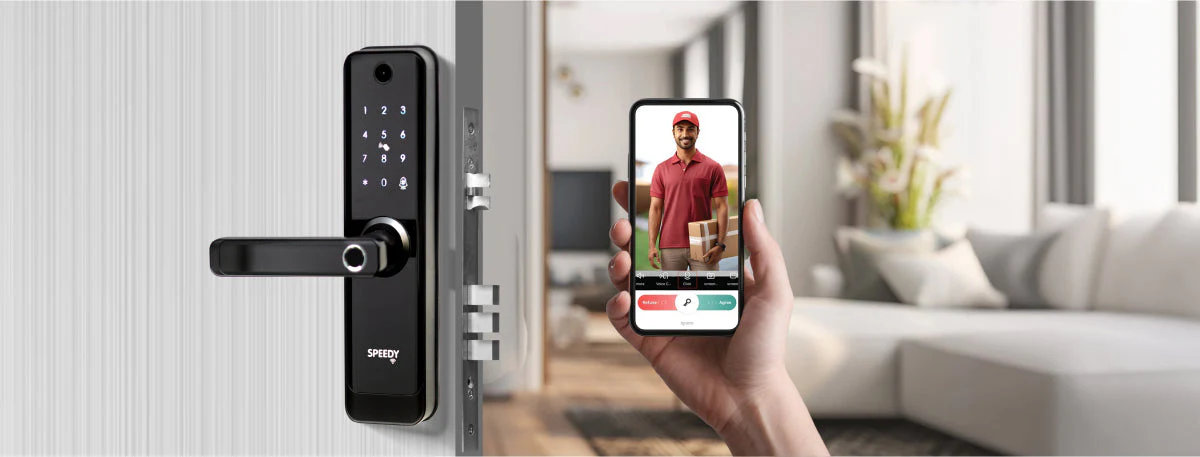
Why Should You Pair a Home Camera with a Smart Lock?
Simply put, these two devices are good on their own, but they’re absolutely brilliant together. A standalone smart lock gives you keyless entry. A standalone camera lets you see what’s happening. When you combine them, you create a seamless, interactive security system that provides context and control.
Think about it. A notification that your “front door was unlocked” is useful. But a notification that your “front door was unlocked” accompanied by a video clip of your daughter arriving safely from school is true peace of mind. This synergy is what the home camera integration with smart locks is all about.
Here are a few everyday scenarios where this integration shines:
- Package Deliveries: See the delivery driver arrive, unlock the door for them to place the package securely inside, and lock it again once they leave. No more porch pirates.
- Guest and Service Access: Your friend is arriving early? Let them in from your office. The dog walker or cleaning service has arrived? Grant them temporary access and get a video notification confirming they’ve arrived and left on time.
- Family Check-ins: Get an alert with a video snapshot when your kids get home from school. You know not just that the door was unlocked, but exactly who came through it and when.
- Deterring Unwanted Visitors: See a suspicious person lurking at your door? You can speak to them directly through your camera’s two-way audio and let them know they’re being watched, all while ensuring your door remains securely locked.
How Does Home Camera Integration with Smart Locks Actually Work?
This integration works by allowing your camera and smart lock to communicate with each other, typically through your home’s Wi-Fi network and a shared smartphone app. When one device detects an event, it can trigger an action in the other, creating a smart, automated response.
The magic happens within a single ecosystem or app. When someone approaches your door, the camera’s motion sensor is triggered. It starts recording and sends you an alert. From that same app, you see a live video feed of your doorstep. You can then access the controls for your smart lock to either unlock the door or keep it secured. It’s a seamless workflow that puts you in complete command of your front door.
As cybersecurity specialist Dr. Adrian Foster often advises, “The strength of a smart home is its ecosystem. When devices like cameras and locks work together under a single, secure platform, they close security gaps that might exist when using multiple, disconnected apps. It creates a more responsive and intelligent security perimeter.”
Key Features to Look For in an Integrated System
When you start shopping, the number of features can feel overwhelming. Don’t worry, I’m here to cut through the noise. Here are the must-have features for a powerful home camera integration with smart locks.
- Unified App Control: This is non-negotiable. You need to be able to see your camera feed and control your lock from one single app. Juggling multiple apps completely defeats the purpose and convenience.
- Two-Way Audio: The ability to hear and speak to whoever is at your door is crucial. It lets you give instructions to a delivery person or warn off a potential intruder.
- Remote Access: You should be able to lock and unlock your door from anywhere with an internet connection. This is the core of remote home management.
- Smart Alerts with Snapshots: Your system should send you intelligent alerts that distinguish between people, animals, and vehicles. The notification should ideally include a thumbnail image or short video clip so you know what’s happening at a glance.
- Guest Access Codes: A great smart lock feature that’s enhanced by a camera. You can create temporary or recurring codes for guests or service providers and receive a video alert when that specific code is used.
- HD Video with Night Vision: What’s the point of a camera if you can’t see anything clearly? Look for at least 1080p HD resolution and high-quality infrared night vision to ensure you have a clear picture, day or night.
- Activity Log: A detailed, time-stamped log of all events—door locked, door unlocked (and by whom), motion detected—paired with corresponding video clips.
All-in-One vs. Separate Components: Which Path to Choose?
When building your system, you generally have two options: buy an all-in-one solution (like a video doorbell from the same brand as your smart lock) or mix and match best-in-class devices from different brands that are compatible with each other.
| Approach | Pros | Cons |
|---|---|---|
| All-in-One System (Same Brand) | – Guaranteed compatibility – Seamless single-app experience – Often easier to set up |
– May have to compromise on features for one device – Locked into one brand’s ecosystem |
| Separate Components (Different Brands) | – Can choose the absolute best camera and best lock – More flexibility and customization – Can integrate via platforms like Apple HomeKit, Google Home, or Amazon Alexa |
– Compatibility can be tricky (check before you buy!) – Setup can be more complex – May not have 100% feature integration |
For most people, I recommend starting with an all-in-one system from a reputable brand. The ease of use and guaranteed integration provide a fantastic, hassle-free experience.
Is My Smart Security System Actually Secure?
It’s a fair question. You’re connecting the very keys to your kingdom to the internet. The good news is that reputable manufacturers take this very seriously. However, the security of your system is a shared responsibility.
Here are a few critical steps to ensure your home camera integration with smart locks is as secure as possible:
- Use a Strong, Unique Password: Don’t reuse the same password you use for your social media. Create a long, complex password for your security app account.
- Enable Two-Factor Authentication (2FA): This is one of the single most effective things you can do. It requires a second code (usually from your phone) to log in, stopping hackers in their tracks even if they steal your password.
- Secure Your Home Wi-Fi: Your smart devices are only as secure as the network they’re on. Ensure your Wi-Fi router has a strong password and uses WPA2 or WPA3 encryption.
- Keep Firmware Updated: Manufacturers regularly release updates to patch security vulnerabilities. Always install these updates for your camera, lock, and router as soon as they are available.
Frequently Asked Questions (FAQ)
Q: Can I integrate any home camera with any smart lock?
A: No, not necessarily. Compatibility is key. The easiest way is to buy devices from the same brand. Alternatively, look for products that work with a common smart home platform like Amazon Alexa, Google Assistant, or Apple HomeKit, which can act as a bridge between them.
Q: Do I need a subscription for these features to work?
A: It depends on the brand. Basic functions like live viewing and remote locking/unlocking are usually free. However, for features like cloud video storage, advanced person detection, and extended video history, most brands require a monthly or yearly subscription.
Q: What happens if my Wi-Fi or power goes out?
A: Your smart lock will still function as a normal lock; you can always use the physical key. The camera and remote access features, however, will be offline until power and internet are restored. Some cameras offer local storage (SD card) to continue recording during an internet outage.
Q: How difficult is the installation process?
A: For most DIY-savvy homeowners, installation is straightforward. Smart locks typically fit into standard door preparations, and wireless cameras are very easy to mount. Most systems come with detailed step-by-step instructions in their apps. If you’re not comfortable, professional installation is always an option.
Q: Can I control my integrated system with voice commands?
A: Yes! Most modern systems integrate with voice assistants. You can say things like “Hey Google, show me the front door camera” or “Alexa, lock the front door.” For security, unlocking with your voice usually requires a spoken PIN code.
The Final Verdict
The world of home security is moving beyond simple alarms and into smart, interactive ecosystems that give you real control. The home camera integration with smart locks is at the forefront of this evolution. It’s not just about adding another gadget to your home; it’s about creating a responsive, intelligent front door that adds real convenience and profound peace of mind to your daily life. By choosing the right equipment and following best security practices, you can make your home not just smarter, but truly safer.