The best place to buy home camera systems depends on your priorities: online marketplaces like Amazon offer the widest selection and competitive pricing, while big-box retailers such as Best Buy provide hands-on experience and easy returns. For expert advice and curated, high-quality selections, specialized security retailers are ideal. Choosing the right vendor ensures you get a reliable system for peace of mind and effective home monitoring.
Why Do I Actually Need a Home Camera?
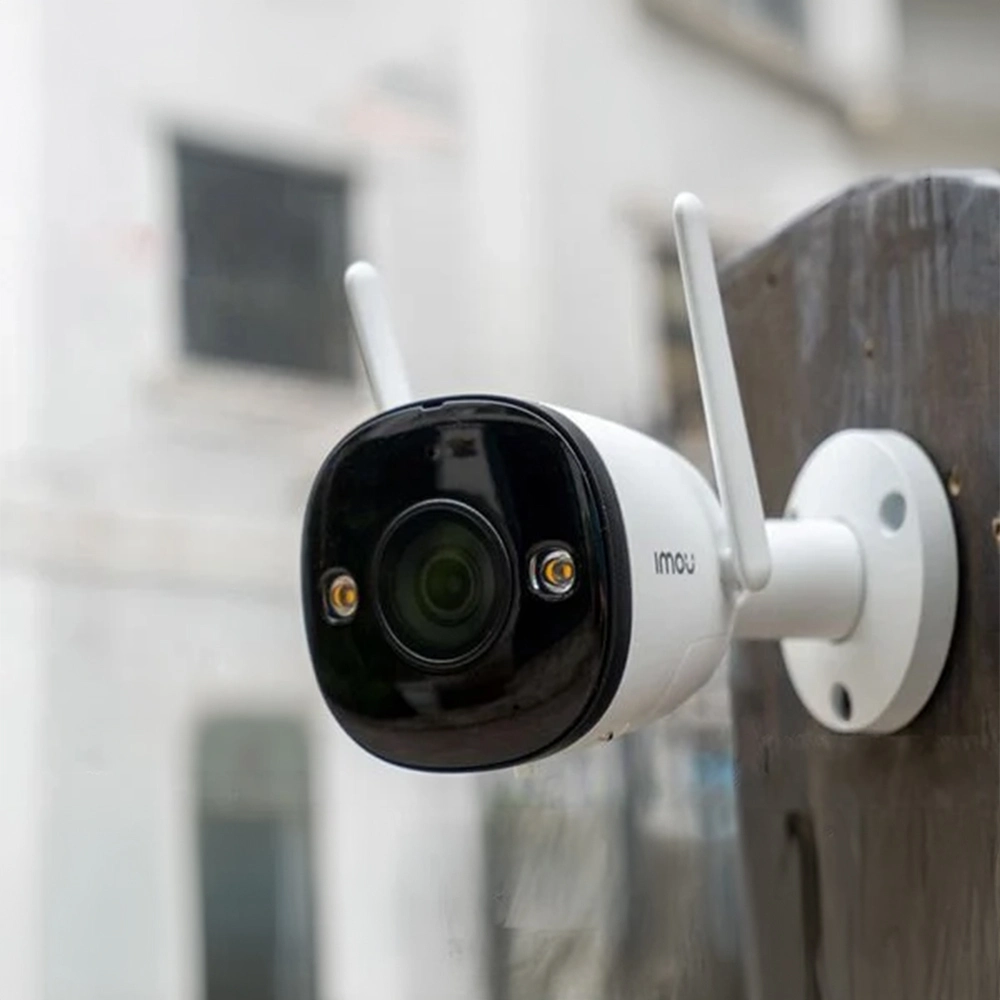
You might be thinking, “Is a camera really necessary for my home?” The answer is a resounding yes, and it goes far beyond just catching a porch pirate in the act (though it’s fantastic for that). A good home camera is your silent guardian, your remote connection to what matters most.
Think of it this way: a camera serves as a powerful deterrent. A visible camera can make a potential intruder think twice and move on to an easier target. It’s also your eyewitness. If something does happen, you have crystal-clear evidence to provide to law enforcement. But for many of us, it’s the everyday peace of mind that’s priceless. It’s about checking in on your pets while you’re at work, making sure the kids got home from school safely, or even confirming that a package was delivered. My own camera once helped me prove to a delivery company that their driver had tossed a fragile package over the gate. It’s for the big moments and the small ones.
Key Features to Hunt for Before You Buy
Before we dive into where to shop, let’s quickly cover what you should be looking for. Buying a camera without knowing these basics is like buying a car without checking the engine. You might end up with something that looks good but doesn’t do the job.
- Resolution and Field of View: You want at least 1080p Full HD resolution. Anything less and you’ll be squinting at a blurry image, trying to figure out if that’s a person or a garden gnome. The field of view determines how much the camera can see. A wider angle (130 degrees or more) is great for covering a large area like a backyard or living room.
- Night Vision: This is non-negotiable. Most incidents happen under the cover of darkness. Modern cameras use infrared (IR) LEDs to see clearly in pitch-black conditions. Color night vision is a premium feature that uses ambient light to produce colored images at night, which can be incredibly helpful for identifying details.
- Motion Detection and Smart Alerts: A camera that records 24/7 will fill up your storage fast. Motion detection is a standard feature, but the quality of that detection varies. Look for cameras with “smart” alerts that can differentiate between people, animals, and vehicles. This stops you from getting a notification every time a cat walks across your lawn.
- Storage: Cloud vs. Local: Where will your video be saved?
- Cloud Storage: Your footage is uploaded to a secure server. This is great because even if a thief steals your camera, the evidence is safe. Most brands offer this via a monthly subscription.
- Local Storage: The video is saved to a microSD card or a local hard drive (NVR/DVR). This is a one-time cost with no monthly fees, but if the device is damaged or stolen, your footage is gone with it.
- Two-Way Audio: This feature turns your camera into an intercom. You can talk to the delivery person, greet your kids, or tell your dog to get off the couch—all from your phone.
The Big Question: Where is the Best Place to Buy Home Camera Systems?
Alright, you know what you’re looking for. Now, let’s navigate the retail landscape. The “best” place is subjective and depends entirely on what you value most: expert advice, convenience, price, or seeing the product firsthand.
Big-Box Retailers (e.g., Best Buy, Costco)
|
Our Picks for the Best Home Camera in 2026
As an Amazon Associate, we earn from qualifying purchases.
|
||
| Num | Product | Action |
|---|---|---|
| 1 | 2K Cameras for Home Security-Outdoor/Indoor Camera for Dog/Cat/Pet/Nanny/Baby, Color Night Vision, White Light, Siren, 24/7 SD Recordings, Works with Alexa/Google Home, C1 (C1-White-2pack-2.4G) |

|
| 2 | Tapo TP-Link 1080P Indoor Security Camera for Baby Monitor, Dog Camera w/Motion Detection, 2-Way Audio Siren, Night Vision, Cloud & SD Card Storage, Works w/Alexa & Google Home C100 |
|
| 3 | Ring Battery Doorbell | Home or business security with Head-to-Toe Video, Live View with Two-Way Talk, and Motion Detection & Alerts (newest model), Venetian Bronze |
|
| 4 | Blink Mini 2 — Home Security & Pet Camera(s) with HD video, color night view, motion detection, two-way audio, and built-in spotlight — 1 camera (Black) |
|
| 5 | TP-Link Tapo 2K Pan/Tilt Security Camera for Baby Monitor, Dog Camera w/Motion Detection, 2-Way Audio, Siren, Night Vision, Cloud & SD Card Storage, Works with Alexa & Google Home, 2-Pack (C210P2) |
|
| 6 | TP-Link Tapo Pan/Tilt Security Camera for Baby Monitor, Pet Camera w/Motion Detection, 1080P, 2-Way Audio, Night Vision, Cloud & SD Card Storage, Works with Alexa & Google Home (Tapo C200) |
|
| 7 | WYZE Cam Pan v3, Indoor/Outdoor IP65-Rated 1080p Pan/Tilt/Zoom Wi-Fi Smart Home Security Camera with Color Night Vision, 2-Way Audio, Compatible with Alexa & Google Assistant, Free Expert Setup |
|
| 8 | Kasa Smart Indoor Pan-Tilt Home Security Camera, 1080p HD Dog Camera w/Night Vision, Motion Detection for Baby & Pet Monitor, Cloud & SD Card Storage, Works w/ Alexa & Google Home, 2.4G WiFi (EC71) |
|
| 9 | WYZE Cam v4 (Latest Model), 2.5K AI Security Camera, Indoor/Outdoor Cameras for Home Security, Baby Monitor & Pet Camera, Vibrant Color Night Vision, No Subscription Required, Free Expert Help |
|
| 10 | Ring Outdoor Cam (Stick Up Cam) | Weather-Resistant Outdoor Camera, Live View, Color Night Vision, Two-Way Talk, Motion alerts, Works with Alexa | White |
|
These are the giants of electronics. Walking into one of these stores gives you the immediate advantage of seeing and touching the product.
- Pros:
- Hands-On Experience: You can compare the size, build quality, and feel of different cameras before you commit.
- Immediate Gratification: Buy it and take it home the same day. No waiting for shipping.
- Easy Returns: If you don’t like it or it doesn’t work for your space, returning it is usually a straightforward process.
- Cons:
- Limited Selection: They typically only carry the most popular, mainstream brands. You might miss out on niche or newer brands with innovative features.
- Sales Staff Expertise Varies: You might get a knowledgeable associate, or you might get someone who was selling refrigerators five minutes ago.
Online Marketplaces (e.g., Amazon)
For sheer volume and variety, nothing beats online marketplaces. They are a one-stop-shop for almost every camera brand imaginable.
- Pros:
- Massive Selection: You can find everything from budget-friendly options to high-end professional systems.
- Competitive Pricing: With so many sellers, prices are often lower, and you can easily spot sales and deals.
- Customer Reviews: This is a goldmine of information. Real-world feedback from hundreds of users can tell you more than any marketing material ever will.
- Cons:
- Analysis Paralysis: The sheer number of choices can be overwhelming for a first-time buyer.
- Risk of Fakes: Always buy from the official brand store or a highly-rated, reputable seller to avoid counterfeit products.
- No Physical Inspection: You’re relying on photos and reviews. What looks sturdy online might feel cheap in your hands.
Directly From the Manufacturer (e.g., Google, Ring, Arlo)
Going straight to the source has its perks, especially if you’re already invested in a particular brand’s ecosystem.
- Pros:
- Guaranteed Authenticity: You know you’re getting a genuine product with a full warranty.
- Access to Bundles and Deals: Manufacturers often have exclusive bundles (e.g., a camera pack with a video doorbell) that you can’t find elsewhere.
- Specialized Customer Support: Their support team knows their product inside and out.
- Cons:
- No Price Comparison: You’re paying their price, period.
- Biased Information: Naturally, their website will only highlight the best aspects of their products, making objective comparison difficult.
Specialized Security Retailers
These are the businesses, both online and local, that live and breathe security. They offer a curated selection of products they’ve vetted themselves.
- Pros:
- Expert Advice: This is their biggest selling point. You’re talking to people who understand the nuances of security, from ideal camera placement to network security.
- Curated, High-Quality Selection: They don’t sell everything; they sell what works. They’ve already done the filtering for you.
- Installation and Support Services: Many offer professional installation, which is a lifesaver if you’re not tech-savvy.
- Cons:
- Higher Price Point: You’re paying for expertise and service, so prices may be slightly higher than on a massive online marketplace.
- Smaller Inventory: Their selection is intentionally limited to the brands they trust.
“When purchasing any smart home device, especially a camera, it’s crucial to buy from a reputable source. A compromised device bought from a shady third-party seller could potentially create a bigger security risk than having no camera at all. Always prioritize trustworthy vendors over a rock-bottom price.”
— Dr. Evelyn Reed, Cybersecurity Analyst
A Quick Guide to Installation
So you’ve bought your camera. Now what? Don’t be intimidated! Most modern DIY cameras are designed for easy setup.
- Choose the Right Spot: Identify the key areas you want to monitor—front door, back patio, main living area. For outdoor cameras, mount them high enough to be out of easy reach (about 8-10 feet) but angled down to capture faces.
- Check Your Wi-Fi Signal: Before you drill any holes, take your camera to the intended spot and make sure it has a strong Wi-Fi connection on your phone. A weak signal means unreliable video.
- Download the App: Every smart camera has a companion app. Download it to your smartphone and create an account.
- Power It Up: Plug the camera in or insert the charged battery.
- Follow the In-App Instructions: The app will guide you through the process of connecting the camera to your Wi-Fi network. This usually involves scanning a QR code with the camera. It’s typically a 5-minute process.
- Mount It Securely: Once it’s connected and you’ve confirmed the live view looks good, mount the camera firmly using the included hardware.
Let’s Talk Privacy: Keeping Your Eyes Your Own
A camera is meant to watch out for you, not to be watched by others. Security is paramount.
- Use a Strong, Unique Password: Do not use “password123”. Use a long combination of upper/lower case letters, numbers, and symbols for your camera account.
- Enable Two-Factor Authentication (2FA): This is your best defense. It means that even if someone steals your password, they can’t log in without a second code sent to your phone.
- Keep Firmware Updated: Manufacturers release updates to patch security vulnerabilities. Enable automatic updates in your camera’s app.
- Secure Your Home Wi-Fi: Your camera is only as secure as your network. Use a strong password for your Wi-Fi router and ensure it’s using WPA2 or WPA3 encryption.
Frequently Asked Questions (FAQ)
Q: How much should I expect to spend on a good home camera?
A: A reliable indoor camera can start around $50-$100, while a good quality outdoor or battery-powered camera typically ranges from $100 to $250. Systems with multiple cameras and a base station will cost more.
Q: Do I really need a monthly subscription?
A: Not necessarily. If you choose a camera with local microSD card storage, you can avoid monthly fees. However, a subscription for cloud storage provides off-site backup of your footage and often unlocks advanced features like smart person/package detection.
Q: Are wireless cameras better than wired ones?
A: They serve different needs. “Wireless” usually means Wi-Fi-connected. Truly wire-free cameras run on batteries and are incredibly flexible to install but require periodic recharging. Wired cameras (which still connect to Wi-Fi but are plugged in for power) offer continuous recording without battery anxiety.
Q: Where is the best place to physically install a home camera?
A: For outdoors, cover all primary points of entry: front door, back door, and ground-floor windows. For indoors, focus on main thoroughfares like the living room or main hallway. Avoid placing them in private areas like bedrooms or bathrooms.
Q: Can I use my camera if my internet goes down?
A: It depends. Most cloud-based cameras will stop recording and sending alerts. However, cameras that support continuous local recording to a microSD card will keep recording footage, which you can review once your internet connection is restored.
Your Final Decision for Peace of Mind
Ultimately, the best place to buy home camera technology is the one that aligns with your needs. If you’re a confident DIYer who loves to compare specs and prices, an online marketplace like Amazon is your playground. If you value seeing a product first and want a simple return policy, a big-box store is a safe bet. But if you want a curated solution and expert guidance from people who live and breathe this stuff, a specialized security retailer is worth every penny.
Whichever path you choose, remember that you’re not just buying a piece of tech; you’re investing in a feeling of security and a connection to your home. Make an informed choice, and you’ll gain a quiet confidence that your home is looked after, 24/7.
Frequently Asked Questions
How much should I expect to spend on a good home camera?
A reliable indoor home camera typically costs between $50 and $100. For a good quality outdoor or battery-powered camera, expect to pay $100 to $250. Systems with multiple cameras and a base station will naturally have a higher price point.
Do I really need a monthly subscription for my home camera?
Not necessarily. Many cameras offer local storage options, such as a microSD card, which allows you to avoid monthly fees. However, cloud storage subscriptions provide off-site backup of your footage and often unlock advanced features like smart person or package detection.
Are wireless cameras better than wired ones for home security?
Wireless cameras, which typically connect via Wi-Fi, offer flexible installation. Truly wire-free cameras run on batteries and are easy to place but require periodic recharging. Wired cameras, which are plugged in for power but may still use Wi-Fi for data, provide continuous recording without battery concerns.
Where is the best physical location to install a home camera?
For outdoor cameras, install them at primary entry points like the front door, back door, and ground-floor windows, ideally 8-10 feet high. Indoors, focus on main thoroughfares such as the living room or main hallway. Avoid private areas like bedrooms or bathrooms to maintain privacy.
Can my home camera still function if my internet connection goes down?
It depends on the camera. Most cloud-based cameras will cease recording and sending alerts without an internet connection. However, cameras that support continuous local recording to a microSD card will continue to capture footage, which you can access once your internet service is restored.
How to Install Your New Home Security Camera
Installing a modern DIY home security camera is straightforward. Follow these steps to ensure proper setup and optimal performance for your home monitoring system.
Identify key areas for monitoring, such as your front door, back patio, or main living area. For outdoor cameras, mount them approximately 8-10 feet high, angled downwards to capture faces effectively and keep them out of easy reach.
Before drilling any holes, take your camera to its intended installation spot. Use your smartphone to verify a strong Wi-Fi connection at that location. A weak signal will lead to unreliable video feeds and alerts.
Every smart camera requires a dedicated companion app. Download it to your smartphone and create an account. This app will guide you through the entire setup process and allow you to manage your camera.
Plug in your camera or insert its charged battery. Follow the in-app instructions to connect the camera to your home Wi-Fi network, which often involves scanning a QR code with the camera. This process typically takes about 5 minutes.
Once the camera is connected and you've confirmed the live view is working correctly, use the included hardware to firmly mount the camera in its chosen location. Ensure it's stable and provides the desired field of view.
Smart home that does not lock you in
Free PDF — protocol compatibility matrix for 30 hubs and devices.
I was really on the fence about getting a home camera, but after reading about how it’s a powerful deterrent, I decided to go for it. I ended up buying my system from a specialized security retailer, and the advice I got was invaluable. The installation was smooth, and I feel so much more secure knowing my home is monitored. Definitely worth the investment for peace of mind.
I went with Amazon for my camera because of the wide selection and competitive pricing, which was a big plus. The camera itself is decent for the price, but I had a bit of a struggle with the initial setup process. The instructions weren’t as clear as I hoped, and it took me longer than expected to get it connected to my Wi-Fi. It’s working now, but that part was a little frustrating.
I picked up my new camera system from Best Buy last week. It was great to be able to see the different models in person before making a decision, and their return policy is super easy if anything goes wrong. The setup was pretty straightforward, and the app integration with my other smart home devices is working perfectly. I’m really happy with the clarity of the footage.
My biggest concern was catching porch pirates, and this camera has already proven its worth! The motion detection is spot on, and I get instant alerts on my phone. I appreciate knowing I have that remote connection to my home, even when I’m at work. It’s a fantastic addition to my smart home setup and gives me a lot of confidence.