Securing your home with a budget-friendly camera is more accessible than ever, with many reliable options available for under $100 that offer essential features like 1080p video, night vision, and motion alerts. These affordable devices provide peace of mind by allowing you to monitor your property, check on loved ones, and receive instant notifications directly to your smartphone, making home security a practical reality for any budget.
My own camera recently saved me a ton of hassle. I got a notification that a package was delivered, but when I got home, it was nowhere to be found. A quick peek at the footage showed the delivery driver leaving it behind a bush to keep it hidden from porch pirates. Without that camera, I would have been stuck in a frustrating loop of “lost package” claims. It’s these small, everyday moments where a good home camera truly proves its worth. So, let’s dive in and figure out how to find the perfect, wallet-friendly guardian for your castle.
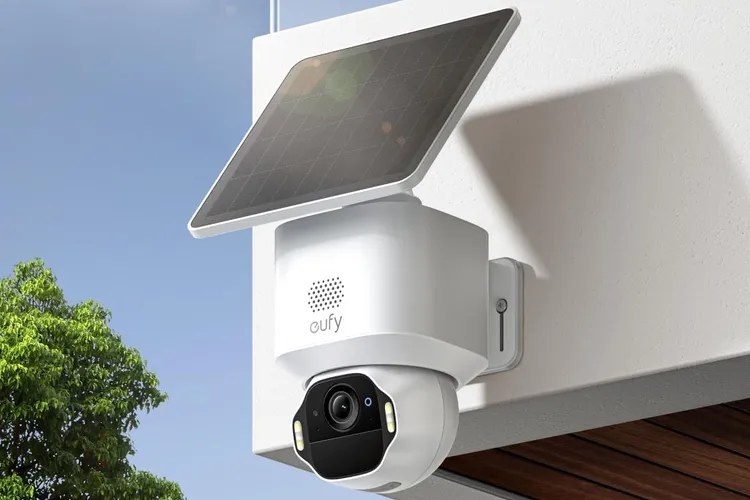 For compare top home security on this site.
Why Do You Really Need a Home Camera?
Beyond catching sneaky delivery drivers, a home camera serves multiple roles that can make your life easier and safer. It’s not just about deterring burglars; it’s about staying connected to your home and loved ones in a meaningful way.
Think of it as your eyes and ears when you can’t be there. A home camera allows you to:
- Monitor Your Property: Keep an eye on your front door, backyard, or garage 24/7. This is your first line of defense against potential intruders.
- Check on Loved Ones: Use an indoor camera to see if the kids got home from school safely, check on an elderly parent, or simply see what your mischievous pets are up to. My dog has a secret life as a couch cushion redecorator, and I have the footage to prove it.
- Receive Important Alerts: Modern cameras can send instant notifications to your phone when they detect motion or sound, so you’re always in the know.
- Gather Evidence: In the unfortunate event of a break-in or theft, clear video footage is invaluable for police reports and insurance claims.
The Main Flavors: A Look at Different Camera Types
When you start shopping, you’ll mainly see two categories. Don’t get bogged down by jargon; the difference is quite simple.
Indoor vs. Outdoor Cameras
This one is pretty straightforward. Outdoor cameras are built tough. They have to be weatherproof (look for an IP rating like IP65 or higher) to withstand rain, snow, and dust. They are your sentinels, watching over the perimeter of your home. Indoor cameras are designed for the inside. They’re typically smaller, less obtrusive, and often have features better suited for interior spaces, like pan-and-tilt capabilities to survey an entire room.
Wired vs. Wire-Free Cameras
|
Our Picks for the Best Home Camera in 2026
As an Amazon Associate, we earn from qualifying purchases.
|
||
| Num | Product | Action |
|---|---|---|
| 1 | TP-Link Tapo 2K Pan/Tilt Security Camera for Baby Monitor, Dog Camera w/Motion Detection, 2-Way Audio, Siren, Night Vision, Cloud & SD Card Storage, Works with Alexa & Google Home, 2-Pack (C210P2) |

|
| 2 | Ring Battery Doorbell | Home or business security with Head-to-Toe Video, Live View with Two-Way Talk, and Motion Detection & Alerts (newest model), Venetian Bronze |
|
| 3 | Kasa Smart Indoor Pan-Tilt Home Security Camera, 1080p HD Dog Camera w/Night Vision, Motion Detection for Baby & Pet Monitor, Cloud & SD Card Storage, Works w/ Alexa & Google Home, 2.4G WiFi (EC71) |
|
| 4 | TP-Link Tapo Pan/Tilt Security Camera for Baby Monitor, Pet Camera w/Motion Detection, 1080P, 2-Way Audio, Night Vision, Cloud & SD Card Storage, Works with Alexa & Google Home (Tapo C200) |
|
| 5 | WYZE Cam v4 (Latest Model), 2.5K AI Security Camera, Indoor/Outdoor Cameras for Home Security, Baby Monitor & Pet Camera, Vibrant Color Night Vision, No Subscription Required, Free Expert Help |
|
| 6 | 2K Cameras for Home Security-Outdoor/Indoor Camera for Dog/Cat/Pet/Nanny/Baby, Color Night Vision, White Light, Siren, 24/7 SD Recordings, Works with Alexa/Google Home, C1 (C1-White-2pack-2.4G) |
|
| 7 | Tapo TP-Link 1080P Indoor Security Camera for Baby Monitor, Dog Camera w/Motion Detection, 2-Way Audio Siren, Night Vision, Cloud & SD Card Storage, Works w/Alexa & Google Home C100 |
|
| 8 | Ring Outdoor Cam (Stick Up Cam) | Weather-Resistant Outdoor Camera, Live View, Color Night Vision, Two-Way Talk, Motion alerts, Works with Alexa | White |
|
| 9 | Blink Mini 2 — Home Security & Pet Camera(s) with HD video, color night view, motion detection, two-way audio, and built-in spotlight — 1 camera (Black) |
|
| 10 | WYZE Cam Pan v3, Indoor/Outdoor IP65-Rated 1080p Pan/Tilt/Zoom Wi-Fi Smart Home Security Camera with Color Night Vision, 2-Way Audio, Compatible with Alexa & Google Assistant, Free Expert Setup |
|
This refers to how the camera gets its power and connects to the internet.
- Wired Cameras: These cameras plug into a power outlet and often connect to your internet via Wi-Fi. They offer a constant, reliable stream of power, so you never have to worry about changing batteries.
- Wire-Free (or Wireless) Cameras: These are the champions of flexibility. They run on rechargeable batteries and connect to your Wi-Fi, meaning you can place them virtually anywhere without drilling holes or running cables. The trade-off? You’ll need to recharge them every few months.
Core Features: What to Look for in a Great Budget Camera
When you’re navigating the world of affordable security, knowing which features truly matter can save you from buyer’s remorse. Here’s a breakdown of the essentials.
- Video Resolution (The Clarity Factor): You’ll see terms like 720p, 1080p, and 2K. For a budget camera, 1080p (Full HD) is the sweet spot. It’s clear enough to make out important details like faces or license plates without requiring massive amounts of storage space. 720p is often too grainy, so try to avoid it if you can.
- Night Vision: What good is a camera that goes blind after sunset? All decent cameras have infrared (IR) night vision, which produces a clear black-and-white image in total darkness. Some newer budget models even offer color night vision, which uses ambient light or a small spotlight to capture footage in color.
- Field of View (How Much It Sees): This is the angle the camera can capture, measured in degrees. A wider field of view (e.g., 130 degrees or more) means you need fewer cameras to cover a large area like a living room or backyard.
- Two-Way Audio: This feature includes a built-in microphone and speaker. It lets you hear what’s happening and speak through the camera from your phone. You can tell the delivery person where to leave a package or startle your cat off the kitchen counter from miles away.
- Motion Detection and Alerts: This is the camera’s brain. It can detect movement, and when it does, it starts recording and sends a notification straight to your smartphone. Look for cameras that offer customizable motion zones, so you can tell it to ignore a busy street and only alert you when someone steps onto your porch.
- Storage Options (Where the Video Goes): This is a huge consideration in any budget home camera review.
- Local Storage: Many cameras have a microSD card slot. You buy a card, pop it in, and the footage is saved directly on the device. It’s a one-time cost with no monthly fees.
- Cloud Storage: Many brands offer a subscription service where your video clips are securely uploaded to the internet. This is great because your footage is safe even if a thief steals the camera itself. Many companies offer a free basic plan or a free trial.
A Simple Guide to Setting Up Your New Camera
Worried about a complicated installation? Don’t be. Most modern DIY security cameras are designed to be set up in minutes.
- Find the Perfect Spot: Choose a location that gives you the best possible view of the area you want to monitor. For front doors, place it high enough to see visitors’ faces but out of easy reach. For indoors, a corner of the room often provides the widest vantage point.
- Power It Up: If it’s a wired camera, plug it in. If it’s wireless, make sure the battery is fully charged before you mount it.
- Download the App: Every smart camera has a companion app for your smartphone. Go to your app store, search for the brand’s name, and download it.
- Connect to Wi-Fi: Follow the in-app instructions. This usually involves creating an account and scanning a QR code with the camera to connect it to your home’s Wi-Fi network. Make sure you have a strong Wi-Fi signal where you plan to place the camera.
- Configure Your Settings: This is the fun part! Customize motion sensitivity, set up alert schedules, and define any specific motion zones. Take a few minutes to explore the app and tailor it to your needs.
The Elephant in the Room: Privacy and Security
It’s completely normal to feel a bit strange about putting an internet-connected camera in your home. Your privacy and security are paramount. Fortunately, you can take simple but powerful steps to lock down your devices.
“The single most important thing a user can do is change the camera’s default password to something long, unique, and complex. Combine this with two-factor authentication, and you’ve already eliminated the most common threats.” – Dr. Eleanor Vance, Cybersecurity Analyst
Here’s a quick checklist to keep your camera feed for your eyes only:
- Create a Strong, Unique Password: Never use the default password. Don’t reuse passwords from other accounts. Use a password manager if you need help creating and remembering strong ones.
- Enable Two-Factor Authentication (2FA): This is a critical security layer. It means that even if someone steals your password, they can’t log into your account without a second code, which is usually sent to your phone.
- Keep Firmware Updated: The camera’s manufacturer will release updates to patch security vulnerabilities. Always install these updates as soon as they are available through the app.
- Secure Your Wi-Fi Network: Your home Wi-Fi is the gateway to your camera. Make sure your router is protected with a strong WPA2 or WPA3 password.
Making Your Camera Part of a Smart Home
Many budget-friendly cameras can do more than just record video. They can integrate with smart home ecosystems like Amazon Alexa and Google Assistant. This allows for cool, convenient features like:
- “Alexa, show me the front door camera” on your Echo Show.
- Having your smart lights turn on automatically when the backyard camera detects motion at night.
- Using your camera’s motion sensor to trigger other smart home routines.
This level of integration transforms your camera from a simple security device into an active participant in your automated home.
Frequently Asked Questions
What’s the best resolution for a budget home camera?
For budget-friendly options, 1080p (Full HD) is the ideal resolution. It provides a clear, detailed image without the high cost and storage demands of 2K or 4K cameras, making it perfect for identifying faces and other important details.
Do I need to pay a monthly subscription for a budget camera?
Not necessarily. Many budget cameras offer free local storage via a microSD card slot, which avoids any monthly fees. However, if you want the security of cloud storage, most brands offer optional subscription plans with extra features.
Can cheap security cameras be hacked?
Any internet-connected device carries a risk, but you can significantly minimize it. Reputable brands offer security features like encryption. Your biggest defense is practicing good digital hygiene: use a strong, unique password, enable two-factor authentication (2FA), and keep the camera’s firmware updated.
How far can a budget security camera see at night?
Most budget cameras with infrared (IR) night vision can see clearly for about 30 to 50 feet (around 9 to 15 meters) in complete darkness. The exact distance can vary by model, so always check the specifications before buying.
Are wireless cameras better than wired ones for home security?
It depends on your needs. Wireless (battery-powered) cameras offer incredible placement flexibility but require periodic recharging. Wired cameras provide constant power, so they are a “set it and forget it” solution, but your placement is limited by the location of power outlets.
Your Partner in Peace of Mind
Choosing the right security camera doesn’t have to be overwhelming or expensive. By focusing on the core features that deliver real value—like clear 1080p video, reliable night vision, and smart alerts—you can find an amazing device that fits your budget. This budget home camera review is meant to empower you with the knowledge to make a smart, confident decision. Ultimately, the best camera is the one that gives you a tangible sense of security, allowing you to go about your day with one less thing to worry about. Welcome to a safer, more connected home.
Setting Up Your New Home Security Camera
Most modern DIY security cameras are designed for quick and easy setup, typically taking only a few minutes to get started.
Choose a location that provides the best possible view of the area you want to monitor. For front doors, place it high enough to see visitors' faces but out of easy reach. For indoors, a corner of the room often provides the widest vantage point.
If it's a wired camera, plug it into a power outlet. If it's a wireless camera, ensure the battery is fully charged before you mount it to ensure continuous operation.
Every smart camera has a companion app for your smartphone. Go to your app store, search for the brand's name, and download it to begin the setup process.
Follow the in-app instructions, which usually involve creating an account and scanning a QR code with the camera to connect it to your home's Wi-Fi network. Ensure you have a strong Wi-Fi signal where the camera will be placed for reliable performance.
Customize motion sensitivity, set up alert schedules, and define any specific motion zones within the app. Take a few minutes to explore the app and tailor the settings to your specific security needs.
Smart home that does not lock you in
Free PDF — protocol compatibility matrix for 30 hubs and devices.
The motion alerts are great, and I love getting notifications on my phone. My only complaint is that sometimes the alerts are a little too sensitive, even after adjusting the settings. I get a lot of notifications for cars driving by, which can be a bit annoying. Still, for the price, it’s a solid option for keeping an eye on things.
I was really skeptical about getting a security camera for under $100, but this post convinced me to try. The 1080p video quality is surprisingly clear, even at night. It’s given me so much peace of mind knowing I can check on my front door from anywhere. Definitely worth the investment for basic home monitoring.
I needed something simple to keep an eye on my dog when I’m at work, and this budget camera fits the bill perfectly. The night vision works really well, which is a bonus I wasn’t expecting for the price. It’s super easy to set up and the app is user-friendly. I’m glad I didn’t spend a fortune on a more complex system.
This camera is a lifesaver! I had a similar situation with a package delivery, and being able to review the footage instantly saved me a huge headache. The ability to monitor my property and get instant notifications directly to my smartphone is exactly what I needed. It’s amazing what you can get for a budget-friendly option these days.